 So, you can set up Dropbox, or another export app that integrates with the Files app. Moreover, you can automate daily, weekly, or monthly backups for multiple metrics and workouts.
If you want, you can also manually export data using the data selectors. For this, you will need to choose the date range for the data you want to export and select the interval (seconds, minutes, weeks, or years). After that, Health Export will do the rest.
Besides, you can also share manual exports via iMessage, Numbers, Mail and so many other platforms. Moving on, the program enables you to add various Health Widgets:
So, you can set up Dropbox, or another export app that integrates with the Files app. Moreover, you can automate daily, weekly, or monthly backups for multiple metrics and workouts.
If you want, you can also manually export data using the data selectors. For this, you will need to choose the date range for the data you want to export and select the interval (seconds, minutes, weeks, or years). After that, Health Export will do the rest.
Besides, you can also share manual exports via iMessage, Numbers, Mail and so many other platforms. Moving on, the program enables you to add various Health Widgets:
- The Activity Widget
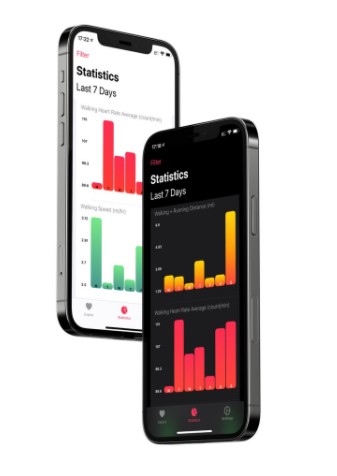
- The Statistics Widget
- The Recent Widget
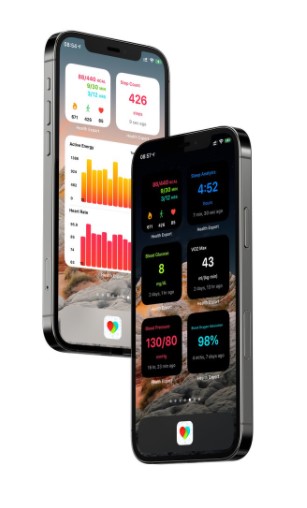 For example, the Activity widget helps you to monitor your Activity Progress, Total Energy Burned, Step Count, and Heart Rate. In the Statistic widget, you can customize up to 6 metrics on the largest widget size. And the Recent Widget demonstrates the most recent data of the selected metric throughout a day.
Don’t forget to take care of your health insurance! Check out the best apps for that.
There is no need to worry about your safety, as all the data stays private. The data is securely synced via iCloud. To sum up, Health Auto Export is full of magnificent options. The majority of users are fully satisfied with this tool. We believe you will like it as well!
For example, the Activity widget helps you to monitor your Activity Progress, Total Energy Burned, Step Count, and Heart Rate. In the Statistic widget, you can customize up to 6 metrics on the largest widget size. And the Recent Widget demonstrates the most recent data of the selected metric throughout a day.
Don’t forget to take care of your health insurance! Check out the best apps for that.
There is no need to worry about your safety, as all the data stays private. The data is securely synced via iCloud. To sum up, Health Auto Export is full of magnificent options. The majority of users are fully satisfied with this tool. We believe you will like it as well!
List of reviewed apps:
Key Features
- Export health and workout data to multiple formats (JSON, CSV, GPX)
- Support for 100+ health metrics and 70+ workout types including heart rate, distance, speed, and GPS routes
- Automated backup scheduling with daily, weekly, or monthly options
- Custom export automation using iOS Shortcuts integration
- Manual data export with flexible date range and interval selection
Pros and Cons
- Pro: Incredibly comprehensive data support — whether you’re tracking steps or GPS routes, this app likely has you covered
- Pro: Automation takes the hassle out of regular backups, so your health data is always safely exported
- Pro: Works seamlessly with cloud storage services like Dropbox for easy access anywhere
- Con: Requires an iPhone app companion, so it’s not a standalone solution
- Con: The learning curve for setting up Shortcuts automation might intimidate less tech-savvy users
Bottom Line
If you’re serious about backing up your health data or want to analyze your workouts outside Apple Health, Health Auto Export is worth downloading. It’s perfect for fitness enthusiasts and data nerds who want complete control over their workout information.