 Sharalike is an easy-to-use program that allows you to create dynamic and themed slideshows accompanied by music, and also gives you the opportunity to share your work on social networks or embed them using a code on a website/blog. To create a slideshow will need to go through a few simple steps.
First of all, you need to register in the application through Facebook or through the mailbox. Then create an album in which we have to upload photos from your mobile phone.
After downloading, we get the opportunity to edit the selected photos. In addition, you can swap photos by holding the object and dragging it to another place.
Sharalike is an easy-to-use program that allows you to create dynamic and themed slideshows accompanied by music, and also gives you the opportunity to share your work on social networks or embed them using a code on a website/blog. To create a slideshow will need to go through a few simple steps.
First of all, you need to register in the application through Facebook or through the mailbox. Then create an album in which we have to upload photos from your mobile phone.
After downloading, we get the opportunity to edit the selected photos. In addition, you can swap photos by holding the object and dragging it to another place.
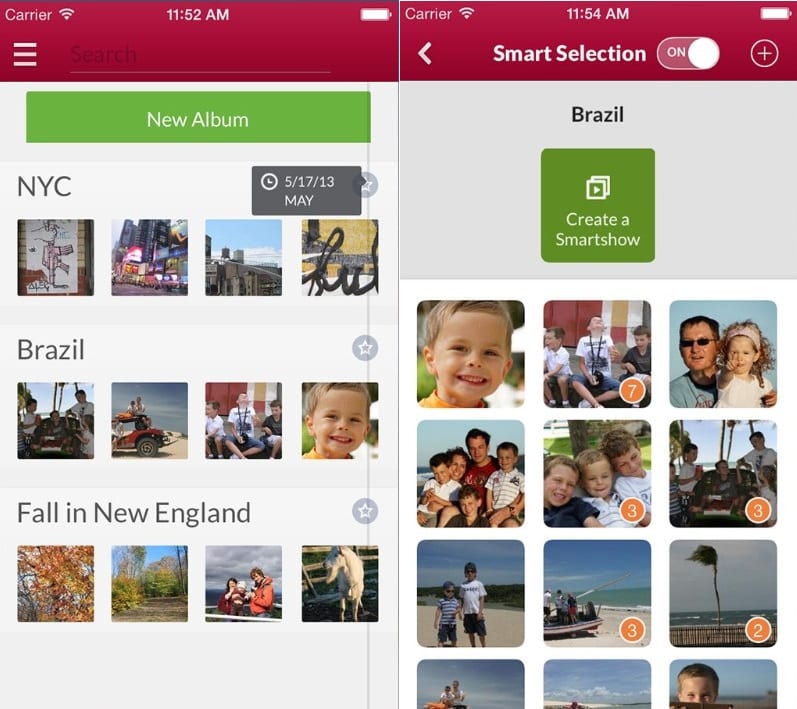 Now we need to choose the music and style of our slideshow. For this, you can use the following functions:
Slide styles. This may be a classic increase, or a romantic story, in addition, there are themes designed for New Year greetings or comic themes in the style of horror films. You can choose the speed of displaying your images.
A diverse collection of music that can accompany a slideshow. There is an option to leave photos without music or download your music track from your phone – for example, the original recording with comments to the photo recorded by yourself.
SAVE to save, and SHARE to distribute links to pages on social networks. The application also allows you to send a link from the video to your email.
After you have chosen the SAVE or SHARE function, the service will provide a link where our slideshow now lives, this is the link we share with friends and readers.
The application provides an amazing opportunity to view the work of other people by clicking on the EXPLORE button in the upper left corner on the main page of the service. If you are not satisfied with your album or photos, you can always delete them.
Now we need to choose the music and style of our slideshow. For this, you can use the following functions:
Slide styles. This may be a classic increase, or a romantic story, in addition, there are themes designed for New Year greetings or comic themes in the style of horror films. You can choose the speed of displaying your images.
A diverse collection of music that can accompany a slideshow. There is an option to leave photos without music or download your music track from your phone – for example, the original recording with comments to the photo recorded by yourself.
SAVE to save, and SHARE to distribute links to pages on social networks. The application also allows you to send a link from the video to your email.
After you have chosen the SAVE or SHARE function, the service will provide a link where our slideshow now lives, this is the link we share with friends and readers.
The application provides an amazing opportunity to view the work of other people by clicking on the EXPLORE button in the upper left corner on the main page of the service. If you are not satisfied with your album or photos, you can always delete them.
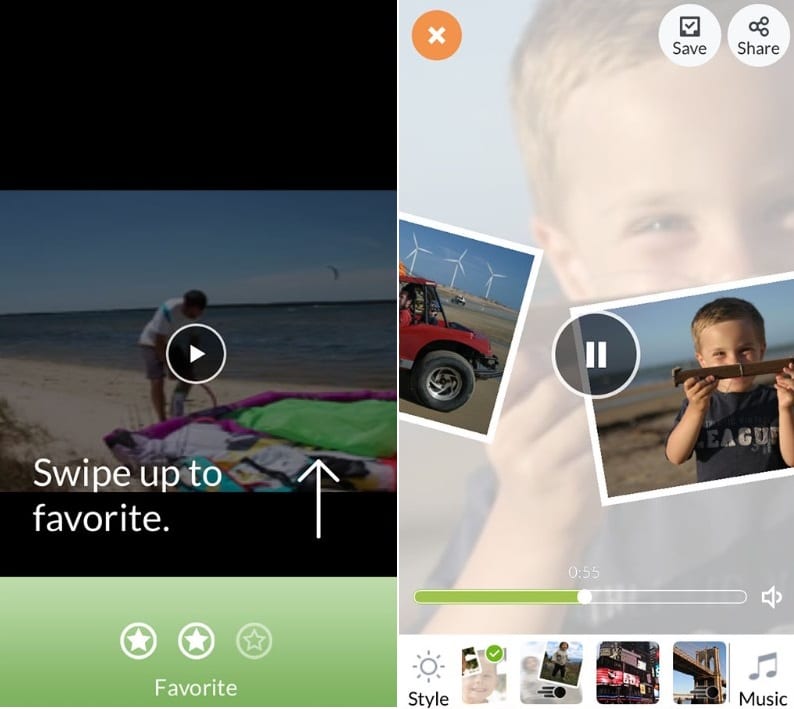 With the Sharalike app, you can create stunning virtual slideshows, complete with an overview, superb graphics and music. Create and share your masterpiece with friends!
(No longer available on the App Store)
(No longer available on Google Play)
Check also [wpsm_highlight color=”yellow”]14 Best free photo sharing apps for iPhone & Android[/wpsm_highlight]
With the Sharalike app, you can create stunning virtual slideshows, complete with an overview, superb graphics and music. Create and share your masterpiece with friends!
(No longer available on the App Store)
(No longer available on Google Play)
Check also [wpsm_highlight color=”yellow”]14 Best free photo sharing apps for iPhone & Android[/wpsm_highlight]
List of reviewed apps:
Key Features
- Create slideshows with customizable themes ranging from romantic to horror-comedy styles
- Add music from the app’s library or upload your own audio tracks from your phone
- Adjust slideshow speed and transition effects to match your creative vision
- Drag-and-drop photo reordering for easy arrangement of your images
- Share directly to social networks or embed slideshows on websites and blogs via code
Pros and Cons
- Pros: Intuitive interface makes slideshow creation a breeze, even for beginners • Diverse music library plus the ability to add your own tracks • Multiple themed styles for different occasions and moods
- Cons: Limited customization options for users wanting more advanced editing controls • Photo editing features could be more robust compared to dedicated photo editing apps
Bottom Line
Sharalike is perfect for anyone who wants to quickly transform their phone photos into shareable, music-accompanied slideshows without fussing with complicated software. If you’re looking to create something special for social media, a blog, or just want to impress friends with your photos set to music, this app delivers an easy and satisfying experience.