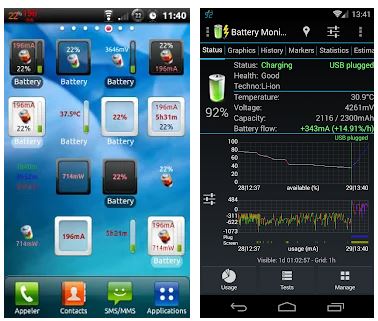
 3C Battery Manager is a functional application that has various convenient and useful functions. The interface divided into 2 control panels. All main sections located on the top section. For example, the top menu bar contains “Status”, “Graphics”, “History”, “Markers”, “Statics”. Menus, and other additional questions contained in the top menu. The user can display battery data on the home screen using widgets.
3C Battery Manager has its own tech support. Formulate your question in detail and send it to the support specialists. The answer won’t take you long to wait.
A simple and user-friendly interface with a dark design and white buttons will allow you to quickly integrate into the control system. Laconic design and no distracting details.
3C Battery Manager is a functional application that has various convenient and useful functions. The interface divided into 2 control panels. All main sections located on the top section. For example, the top menu bar contains “Status”, “Graphics”, “History”, “Markers”, “Statics”. Menus, and other additional questions contained in the top menu. The user can display battery data on the home screen using widgets.
3C Battery Manager has its own tech support. Formulate your question in detail and send it to the support specialists. The answer won’t take you long to wait.
A simple and user-friendly interface with a dark design and white buttons will allow you to quickly integrate into the control system. Laconic design and no distracting details.
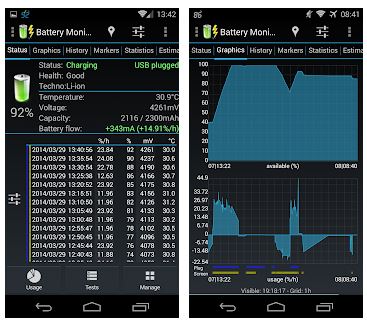 By clicking on “Status” the user will see the required characteristics of the battery of the mobile device. In this section you will see the chart, by clicking on the chart the system will give you additional actions such as “Single graphic”, “Show history”, “Global / Visible min / max”. The “Statics” section will show you details. In which case, you can optimize battery consumption.
Each user can manage the application. Easy integration will allow everyone to master the principle of work.
To save your phone’s battery charge, try these helpful apps.
3C Battery Manager is a unique application that shows accurate battery usage and helps you turn on low power consumption. Moreover, the user can see accurate graphs and calculate the actual battery capacity. In addition, the user can store information about an unlimited number of batteries.
By clicking on “Status” the user will see the required characteristics of the battery of the mobile device. In this section you will see the chart, by clicking on the chart the system will give you additional actions such as “Single graphic”, “Show history”, “Global / Visible min / max”. The “Statics” section will show you details. In which case, you can optimize battery consumption.
Each user can manage the application. Easy integration will allow everyone to master the principle of work.
To save your phone’s battery charge, try these helpful apps.
3C Battery Manager is a unique application that shows accurate battery usage and helps you turn on low power consumption. Moreover, the user can see accurate graphs and calculate the actual battery capacity. In addition, the user can store information about an unlimited number of batteries.

List of reviewed apps:
Key Features
- Real-time battery status monitoring with detailed device parameters
- Visual battery usage graphs and historical data tracking
- Customizable home screen widgets for quick battery information access
- Battery health markers and statistical analysis of consumption patterns
- No registration required to start using the app immediately
Pros and Cons
- Pros:
- Clean, accessible interface that displays essential information without clutter
- Comprehensive battery analytics help identify power-hungry apps and habits
- Responsive customer support team ready to help with detailed questions
- Cons:
- Two-panel layout may feel cramped on smaller phone screens
- Feature-heavy menu bar could benefit from better organization for new users
Bottom Line
If you’re tired of your phone dying mysteriously by noon and want actual insight into what’s draining your battery, 3C Battery Manager is worth installing. It’s especially useful for power users who want to fine-tune their device’s performance and extend daily battery life through informed decisions.