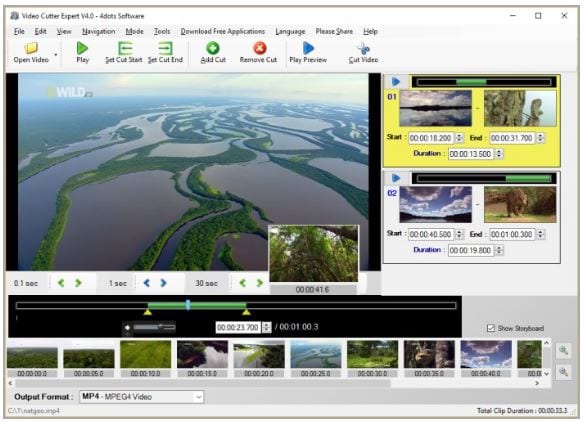
 There is nothing complicated in this program. All you need to do – open it and add a video file from which you want to create video clips. Choose Include mode to add clips for processing. After that, you need to set the start and endpoints using the Set Clip Start/End buttons. When the points are set for the first clip, click on the Add Clip button to integrate the next video file.
After clicking on the Cut Video button, you can set output size, choose destination location, or launch the video clipping process. The output will take some time according to the number of clips and selected format.
You found cool videos on YouTube and want to add them to your video? There is nothing easier! Just check out the best apps to download YouTube videos.
The built-in video player lets you preview the output video clips before starting the process. You can adjust the output parameters and an area where you can select the start and end time for the video clip up to milliseconds.
There is nothing complicated in this program. All you need to do – open it and add a video file from which you want to create video clips. Choose Include mode to add clips for processing. After that, you need to set the start and endpoints using the Set Clip Start/End buttons. When the points are set for the first clip, click on the Add Clip button to integrate the next video file.
After clicking on the Cut Video button, you can set output size, choose destination location, or launch the video clipping process. The output will take some time according to the number of clips and selected format.
You found cool videos on YouTube and want to add them to your video? There is nothing easier! Just check out the best apps to download YouTube videos.
The built-in video player lets you preview the output video clips before starting the process. You can adjust the output parameters and an area where you can select the start and end time for the video clip up to milliseconds.
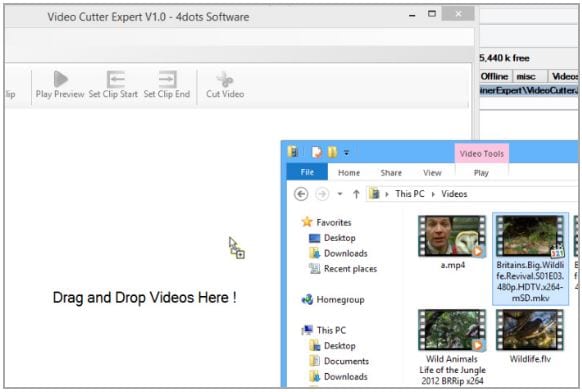 Moving on, Video Cutter Expert enables you to join several video clips in one video file. If you want to do it, click on the Join Clips option. Apart from all these points mentioned above, in this program, you will find such useful functions as storyboard, drag-and-drop, fade-in or fade-out effects, and others.
What is more, you try our best apps for sound editing. We offer you to check out our best auto-tune apps.
Video Cutter Expert is a safe and reliable program. It comes with a fairly clear and intuitive interface. Even novice users will easily handle it. All in all, Video Cutter Expert software is full of magnificent features. It is a must-have tool for all video makers – both professionals and amateurs.
Moving on, Video Cutter Expert enables you to join several video clips in one video file. If you want to do it, click on the Join Clips option. Apart from all these points mentioned above, in this program, you will find such useful functions as storyboard, drag-and-drop, fade-in or fade-out effects, and others.
What is more, you try our best apps for sound editing. We offer you to check out our best auto-tune apps.
Video Cutter Expert is a safe and reliable program. It comes with a fairly clear and intuitive interface. Even novice users will easily handle it. All in all, Video Cutter Expert software is full of magnificent features. It is a must-have tool for all video makers – both professionals and amateurs.
List of reviewed apps:
Key Features
- Cut and trim videos with precise start and end point controls
- Join multiple video clips into a single file
- Support for 9+ popular video formats including MP4, AVI, MOV, and MKV
- Lightweight installation at just 15 MB with multi-language support (38 languages)
- Simple batch processing to handle multiple clips in one project
Pros and Cons
- Pros:
- Straightforward interface that doesn’t require video editing experience
- Fast processing speeds and compact file size
- Versatile format support covers most common video types
- Cons:
- Limited to basic cutting and joining—no advanced effects or filters
- No built-in preview feature to check clips before processing
Bottom Line
Video Cutter Expert is ideal for anyone who needs to quickly trim YouTube videos, cut out unwanted sections, or combine clips without fussing with complex editing software. If you’re looking for no-frills video manipulation that gets the job done fast, this lightweight tool deserves a spot on your device.