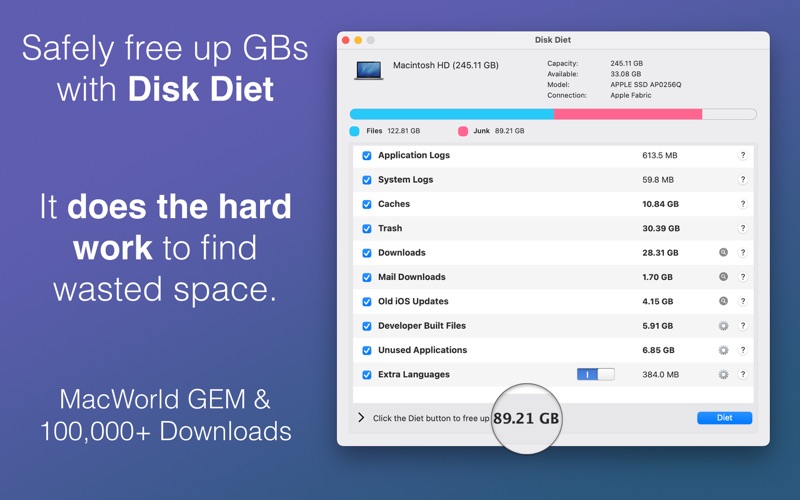
 nMoving on, Disk Diet frees up gigabytes in a minute and searches through the following areas:
n
nMoving on, Disk Diet frees up gigabytes in a minute and searches through the following areas:
n-
n t
- Application Logs n t
- System Logs n t
- Caches n t
- Trash n t
- Downloads n t
- Mail Downloads n t
- Old iOS Software Updates n t
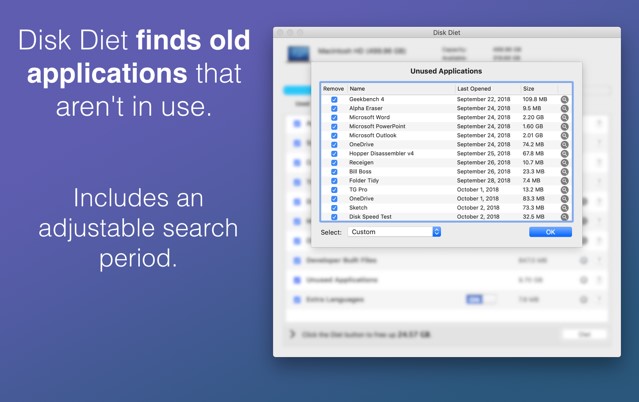
- Unused applications n t
- Unused language translations from applications n t
- Developer Folders from Xcode n t
- iPhoto Trash n
 n
nAs for the app’s interface, it is very simple to manage. The software boasts a minimalistic design that offers convenient navigation. So, we can surely say that there is no need to be very tech-savvy to find out how everything works there.
n
nThe program will take around 10-20 seconds to scan and determine which files can be removed to free up space. Moreover, it allows users to automatically select applications that haven’t been used in the last month, year, etc.
n
nIn order to clean your phone from extra photos, you can use the duplicate photo finder apps.
n
nSummarizing all the points mentioned above, Disk Diet is a must-have tool for all users. We have not found any significant drawbacks of this program, so we believe it will fully suit you!
n
n
n
nAs for the app’s interface, it is very simple to manage. The software boasts a minimalistic design that offers convenient navigation. So, we can surely say that there is no need to be very tech-savvy to find out how everything works there.
n
nThe program will take around 10-20 seconds to scan and determine which files can be removed to free up space. Moreover, it allows users to automatically select applications that haven’t been used in the last month, year, etc.
n
nIn order to clean your phone from extra photos, you can use the duplicate photo finder apps.
n
nSummarizing all the points mentioned above, Disk Diet is a must-have tool for all users. We have not found any significant drawbacks of this program, so we believe it will fully suit you!
n
n
List of reviewed apps:
Key Features
- Scans and removes junk files from caches, logs, and temporary folders in seconds
- Safely deletes unused applications and their associated language files to reclaim storage
- Clears out old iOS software updates and developer files that accumulate over time
- User-friendly interface makes disk cleanup accessible even for non-tech-savvy Mac users
- Lightweight installation that doesn’t ironically consume the space you’re trying to free up
Pros and Cons
- Pros:
- Quick scanning and cleanup process gets your Mac running smoother without lengthy waiting times
- Responsive customer support team available to help if you run into any issues
- Comprehensive coverage of hard-to-find junk files that manual cleanup would miss
- Cons:
- Mac-exclusive tool means Windows users are out of luck
- Aggressive deletion of files requires caution if you’re uncertain about what’s safe to remove
Bottom Line
Disk Diet is perfect for Mac owners drowning in digital clutter who want a fast, trustworthy way to reclaim valuable storage space. If your Mac’s hard drive is gasping for air and you need a reliable cleanup solution with solid support behind it, this app is worth downloading.