Using serial number
Each device, regardless of model and company, has its own unique serial number. For example, Androids of Samsung have a serial number with 11 characters. These are not just random symbols. They have important information. You can easily find out the manufacturing date if you know the serial number. But how do you find the serial number of your device? Follow the next steps.- Find the gear icon in the main menu. These are the settings for your smartphone.
- Find the “About phone” tab and click on it.
- It’s done. You found the serial number. You can see an example in the image below.
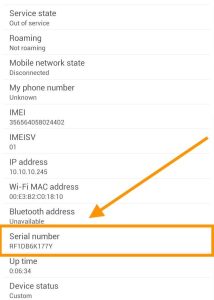 You can also find out the serial number using ADB Shell Commands. This is a special tool for obtaining additional information and actions with your Android. Enter the command that we showed below in the image and you will find out the serial number of your Android.
 There is another easiest way to find out the serial number of your Android. You will be surprised but the serial number is indicated on the back of the panel. Prepare glasses or a magnifying glass to read the serial number. It has a small font.
Using Google Dashboard
If you remember your Google account login and password, then go to Google Dashboard. There you can find out the date of registration of your smartphone. Google Dashboard will show you the Android activation date and additional information as well. By the way, you can rename your device there. Well, and of course there you can find the serial number. You already know what you can do with it.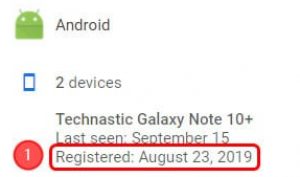
Using Google Play Store
Google Play Store will help you find out the unboxing date of your smartphone. Open your account settings. There you can see the registration date in the “My device” tab. So you knew the fastest and most effective ways to find out the age of your Android. Now no one can deceive you and you can satisfy your curiosity. You may also like: How to Check How Old Your iPhone is? Full GuideKey Features
- Access device serial numbers through Settings menu without technical knowledge
- Decode manufacturing dates from serial number characters
- Use ADB Shell Commands for advanced users seeking detailed device information
- Identify potential refurbished or used devices before purchase
- Works across multiple Android manufacturers and models
Pros and Cons
- Pros:
- Simple step-by-step instructions anyone can follow
- No special apps or downloads required for basic serial number lookup
- Helps protect buyers from purchasing deceptively old devices
- Cons:
- Serial number decoding varies by manufacturer, requiring external research
- ADB Shell Commands section feels incomplete in the guide
Bottom Line
If you’re shopping for a used Android phone or just curious about your device’s age, this guide is a must-read. It breaks down the detective work into painless steps, helping you avoid getting stuck with a secretly ancient smartphone from a sketchy seller.