 If desired, you can create your account, which will allow you to view the offered vacancies and earn money with Zeo, as well as set a password for your profile, link payment cards and create favorites lists.
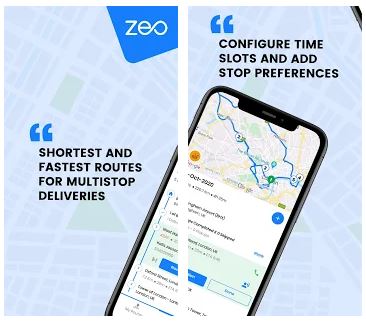
On the main screen, you can set a new route. To do this, you need to select the departure and destination points, add stops along the way and select the most important ones. You can also attach photos to stop points and scan barcodes and qr codes of various places. Your routes are recorded in history under a certain date, so you can remember in detail where you were even a very long time ago.
If desired, you can create your account, which will allow you to view the offered vacancies and earn money with Zeo, as well as set a password for your profile, link payment cards and create favorites lists.
On the main screen, you can set a new route. To do this, you need to select the departure and destination points, add stops along the way and select the most important ones. You can also attach photos to stop points and scan barcodes and qr codes of various places. Your routes are recorded in history under a certain date, so you can remember in detail where you were even a very long time ago.
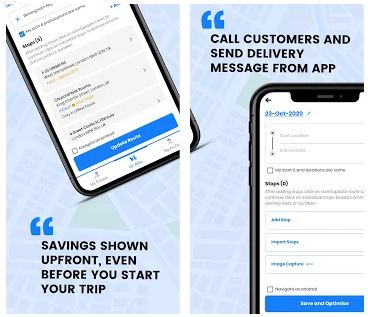 The design of the application meets the requirements of the modern world – nothing distracts you from creating a route, only two colors (white and blue) make up the palette of the application. Technical support can be provided through communication in the application chat, or you can write to the developers by email.
And if you want to track your way or you want to track someone’s way you might need GPS tracking apps.
In general, we can say that the application is ideal for travelers and deliverers of food and goods from online stores! To be able to create routes with more than 500 stop points, you need to purchase the pro version. It is inexpensive, but saving your nerves and time is priceless!
The design of the application meets the requirements of the modern world – nothing distracts you from creating a route, only two colors (white and blue) make up the palette of the application. Technical support can be provided through communication in the application chat, or you can write to the developers by email.
And if you want to track your way or you want to track someone’s way you might need GPS tracking apps.
In general, we can say that the application is ideal for travelers and deliverers of food and goods from online stores! To be able to create routes with more than 500 stop points, you need to purchase the pro version. It is inexpensive, but saving your nerves and time is priceless!


List of reviewed apps:
Key Features
- Multi-stop route planning with customizable waypoints and priorities
- Support for 50+ languages to accommodate international users
- Photo attachment and barcode/QR code scanning at stop locations
- Comprehensive route history organized by date for easy reference
- User account creation with payment card integration and favorites management
Pros and Cons
- Pros:
- Detailed route documentation with photos and barcodes keeps your travel history organized and memorable
- Multilingual interface makes it accessible no matter where you’re headed
- Earning potential through the app’s vacancy system adds an incentive beyond navigation alone
- Cons:
- Requires location access permissions, which some privacy-conscious users may find intrusive
- Account creation, while optional, feels necessary to unlock most of the app’s useful features
Bottom Line
Zeo Route Planner is ideal for delivery drivers, field workers, and frequent travelers who need to document their journeys and optimize their routes. If you’re constantly bouncing between locations and want a detailed record of where you’ve been, this app turns route planning into a more interactive and profitable experience.