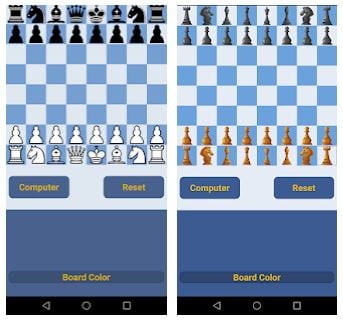
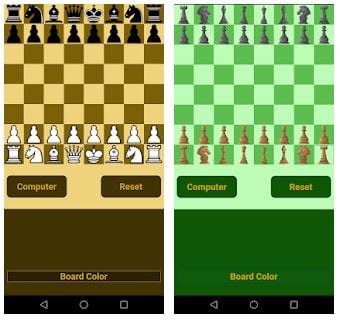
 When you first click on the icon, you have a choice: whether to open the free version (with ads) or to buy a paid one. If you choose a free one, you see a chess field with four buttons below it. Using these buttons, you can change the board’s style (3 options), your figures’ color, Reset (to save or close the game without saving), and the Computer button.
The last one allows you to select the figures’ style, the level of difficulty (there are 20 of them, from beginner to GM) or open a previously saved game. The Deep Chess interface is minimalistic and intuitive. The fields available for moves on the board are highlighted.
When you first click on the icon, you have a choice: whether to open the free version (with ads) or to buy a paid one. If you choose a free one, you see a chess field with four buttons below it. Using these buttons, you can change the board’s style (3 options), your figures’ color, Reset (to save or close the game without saving), and the Computer button.
The last one allows you to select the figures’ style, the level of difficulty (there are 20 of them, from beginner to GM) or open a previously saved game. The Deep Chess interface is minimalistic and intuitive. The fields available for moves on the board are highlighted.
 Secondly, it is possible to play with the computer from the beginning of the game and from any position. You can also make the computer play for both sides.
By the way, if you like playing chess games, you might also like playing home decorating games. They also require you to be concentrated and creative with your decisions!
Also, with Deep Chess, you can solve chess puzzles and improve your ingenuity skill. There are 460 puzzles in total. In the free version, you get access to three of them after watching one ad.
Secondly, it is possible to play with the computer from the beginning of the game and from any position. You can also make the computer play for both sides.
By the way, if you like playing chess games, you might also like playing home decorating games. They also require you to be concentrated and creative with your decisions!
Also, with Deep Chess, you can solve chess puzzles and improve your ingenuity skill. There are 460 puzzles in total. In the free version, you get access to three of them after watching one ad.
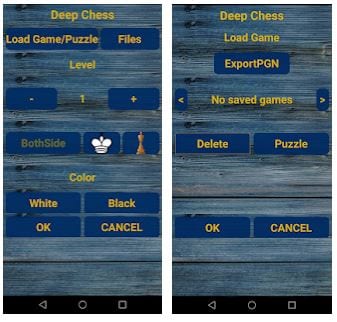 In the paid version, puzzles are available immediately. Viewing ads also gives you hints and the possibility to undo moves. Deep Chess has an excellent option of analyzing a saved game! This is a great bonus for everyone who wants to develop in chess and correct their mistakes. This feature is available not in all chess apps.
Remember we used to play card games on PC? But did you actually know that there are games nowadays which are available for the PC and cell phones? Check out this article to find out.
Summing up, we can say that Deep Chess is what any chess player needs! There are no unnecessary actions or useless functions. You can just install and play right away! We definitely recommend trying it for everyone!
In the paid version, puzzles are available immediately. Viewing ads also gives you hints and the possibility to undo moves. Deep Chess has an excellent option of analyzing a saved game! This is a great bonus for everyone who wants to develop in chess and correct their mistakes. This feature is available not in all chess apps.
Remember we used to play card games on PC? But did you actually know that there are games nowadays which are available for the PC and cell phones? Check out this article to find out.
Summing up, we can say that Deep Chess is what any chess player needs! There are no unnecessary actions or useless functions. You can just install and play right away! We definitely recommend trying it for everyone!

List of reviewed apps:
Key Features
- Play chess against the computer with 20 difficulty levels, from beginner to grandmaster
- Customize your experience with multiple board styles and piece colors
- Save and load games to pick up right where you left off
- Multiplayer mode to challenge friends and other players
- No registration required — start playing instantly
Pros and Cons
- Pros:
- Completely free to play with no mandatory sign-up
- Clean, intuitive interface that doesn’t overwhelm new users
- Wide range of difficulty levels means everyone from rookies to chess nerds can find their match
- Cons:
- Free version includes ads (though a paid ad-free version is available)
- Minimalist design might lack some advanced features serious players expect
Bottom Line
Deep Chess is the perfect companion for anyone who wants to practice their game without needing an actual opponent nearby. Whether you’re killing time on the subway or avoiding homework at midnight, this app delivers straightforward chess gameplay that’s accessible to beginners and challenging enough for experienced players.