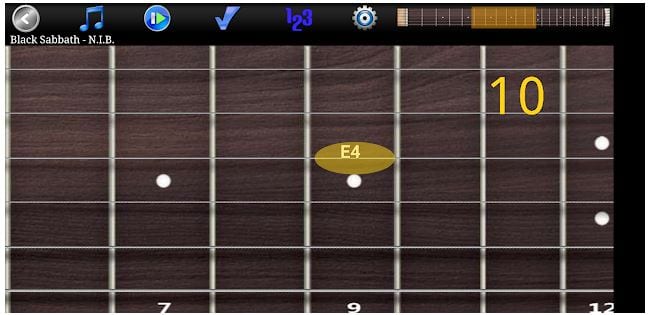
 On the screen, you will have a fretboard with strings and frets. You can scroll a virtual fretboard to select the fret you need. When you click a string, you will see a chord you are playing. In the top menu, you can check yourself. The app tracks what chords were played, and shows you the right variant.
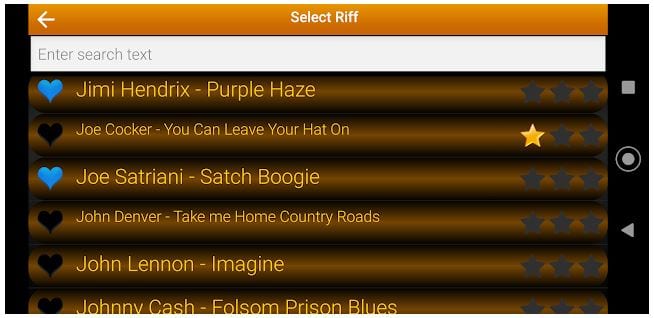 In general settings, you can customize the guitar for yourself. Depending on a song, you can select the guitar – classical, clean, or distortion. It will make the sound more realistic and similar to the original song. The virtual guitar has a resizable fretboard, so it will be suitable for phones and tablets of any model and size.
By the way, do you like playing music games? You will surely find something suitable in our list of the best cross-platform games.
In general settings, you can customize the guitar for yourself. Depending on a song, you can select the guitar – classical, clean, or distortion. It will make the sound more realistic and similar to the original song. The virtual guitar has a resizable fretboard, so it will be suitable for phones and tablets of any model and size.
By the way, do you like playing music games? You will surely find something suitable in our list of the best cross-platform games.
 It allows regulating riff volume and speed, which is important because users can have a different level of skill. Also, you can add vibration and note names. It is created a special tab for notes in the top menu, so customize it as needed to speed up memorization of chords.
For all the creative people out there, you might also want to explore our list of the best polaroid frame apps.
One of the features that it allows to focus on sections of the song to master those chords. The app is very well thought out and is suitable for both beginners and amateurs. Success is provided with the Guitar Pro Riff app! Highly recommend!
It allows regulating riff volume and speed, which is important because users can have a different level of skill. Also, you can add vibration and note names. It is created a special tab for notes in the top menu, so customize it as needed to speed up memorization of chords.
For all the creative people out there, you might also want to explore our list of the best polaroid frame apps.
One of the features that it allows to focus on sections of the song to master those chords. The app is very well thought out and is suitable for both beginners and amateurs. Success is provided with the Guitar Pro Riff app! Highly recommend!


List of reviewed apps:
Key Features
- Interactive virtual fretboard with strings and frets you can scroll and tap to learn chords
- Extensive song library with over 1000 tracks across multiple genres and eras
- Real-time chord recognition that shows you what you’re playing and compares it to the correct version
- Customizable guitar settings to tailor the instrument to your playing style and song requirements
- Practice anywhere, anytime on your phone or tablet without needing an actual guitar
Pros and Cons
- Pros:
- Huge song selection means you’ll find your favorite tracks to practice
- Simple, intuitive interface makes it accessible for beginners
- Instant feedback on your chord accuracy helps you improve faster
- Cons:
- A virtual fretboard can’t fully replicate the feel and muscle memory of a real guitar
- Limited by your device’s screen size—smaller phones might make learning harder
Bottom Line
Download Guitar Pro Riff if you want a convenient way to learn chords and practice popular songs on the go. Whether you’re a complete beginner or looking to supplement your real guitar practice, this app offers an impressive library and user-friendly experience that makes learning fun and accessible.