 LoginBox is a combination of a browser and a password manager. First of all you need to load the necessary passwords into it. To do this, you will have to go through the full authorization procedure: go to the desired site, go to the authorization page, enter your login and password, and after you are authorized, click on the “stop” button in the upper right corner.
Based on the actions, a note with a title, a short description and an icon will be created. Parameters can be edited manually — the convenience is obvious. Thus, LoginBox will record the entire process, and a bookmark of the website will appear in the main menu. Clicking on it, you will immediately be on the site, and in a fully authorized form, without having to look for the input form.
LoginBox is a combination of a browser and a password manager. First of all you need to load the necessary passwords into it. To do this, you will have to go through the full authorization procedure: go to the desired site, go to the authorization page, enter your login and password, and after you are authorized, click on the “stop” button in the upper right corner.
Based on the actions, a note with a title, a short description and an icon will be created. Parameters can be edited manually — the convenience is obvious. Thus, LoginBox will record the entire process, and a bookmark of the website will appear in the main menu. Clicking on it, you will immediately be on the site, and in a fully authorized form, without having to look for the input form.
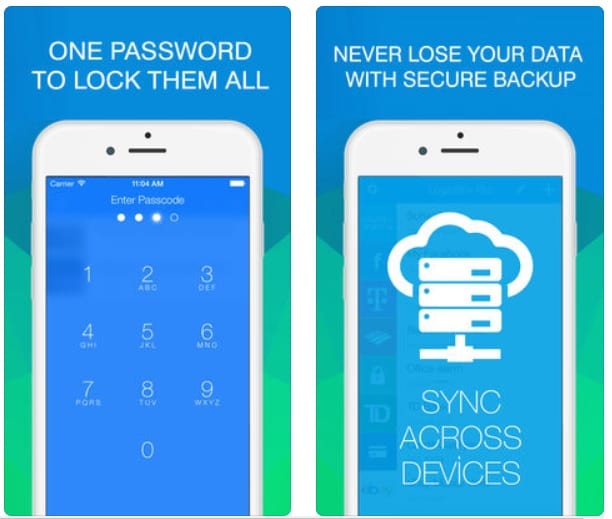 In addition to authorization, you can create protected notes in LoginBox. To protect the content of the application, you use a 4-digit password or fingerprint (for devices with a Touch ID), which you must enter when you start the application. You can also activate the self-destruct data mode with 10 incorrect password attempts. In the notes, you can choose the type of icon, its color and the title. You cannot draw, store images, or perform any other actions.
In LoginBox you do not need to register, created records are synchronized between all connected to your Apple ID devices via iCloud.
The possibility of making of a shortcut with a record on the desktop can be considered a convenient function. It is enough to click on it, and the authorization process will be performed and access to information will be provided but still in the LoginBox browser.
Login Box is distributed as a free version with restrictions and two paid offers:
In addition to authorization, you can create protected notes in LoginBox. To protect the content of the application, you use a 4-digit password or fingerprint (for devices with a Touch ID), which you must enter when you start the application. You can also activate the self-destruct data mode with 10 incorrect password attempts. In the notes, you can choose the type of icon, its color and the title. You cannot draw, store images, or perform any other actions.
In LoginBox you do not need to register, created records are synchronized between all connected to your Apple ID devices via iCloud.
The possibility of making of a shortcut with a record on the desktop can be considered a convenient function. It is enough to click on it, and the authorization process will be performed and access to information will be provided but still in the LoginBox browser.
Login Box is distributed as a free version with restrictions and two paid offers:
- Unlimited — unlimited number of records.
- PRO — lack of advertising, Touch ID, iCloud and unlimited number of records.
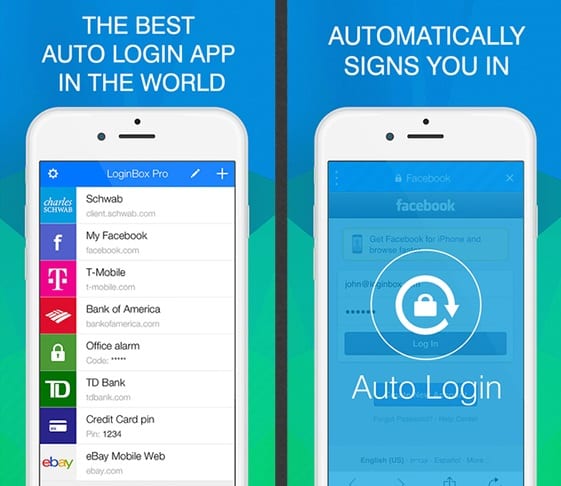 The program can be used to save a variety of information, including credit card numbers, driving licenses, etc.
As a result, we get a really handy application — after spending a little time on full authorization once, you completely forget about this process forever.
(No longer available on the App Store)
Check also [wpsm_highlight color=”green”]17 Free VPN apps for Android & iOS[/wpsm_highlight]
The program can be used to save a variety of information, including credit card numbers, driving licenses, etc.
As a result, we get a really handy application — after spending a little time on full authorization once, you completely forget about this process forever.
(No longer available on the App Store)
Check also [wpsm_highlight color=”green”]17 Free VPN apps for Android & iOS[/wpsm_highlight]
List of reviewed apps:
Key Features
- One-click login to saved websites and accounts
- Automatic password capture and storage during normal browsing
- Master password protection for encrypted data security
- Custom notes with titles, descriptions, and website icons
- Integrated browser for seamless authentication workflows
Pros and Cons
- Pro: Much more secure than browser password storage with encryption and master password protection
- Pro: Incredibly convenient one-click login saves time on repetitive authentication
- Pro: Easy manual editing of saved credentials and account details
- Con: Initial setup requires manually visiting each site and going through full authorization
- Con: Learning curve for users accustomed to automatic browser password managers
Bottom Line
LoginBox is perfect for anyone tired of weak browser passwords and repetitive login clicks. If you value security and convenience equally, this password manager hits the sweet spot between the two—just be prepared to spend a little time getting it set up initially.