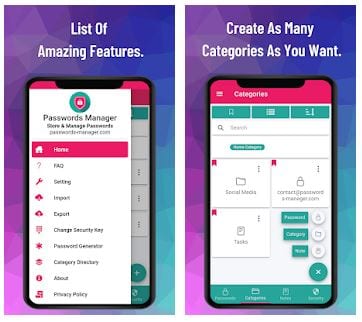
 Choose and tap to the right arrow to watch a video on YouTube on how to use Password Manager and its functions. The last step is Features: the app tells you about its essential and most useful functions.
To use Password Manager, you may either draw a new pattern or enter a password. If you prefer using your fingerprint instead, agree with it when the app asks.
Password Manager interface is quite simple and intuitive. There are four main sections at the bottom of the home screen: Passwords, Categories, Notes, and Security. Next to them, there is a Plus icon. If you tap there, you can create a new password, a new category, or a note. Then you can find them quickly by those four main icons at the bottom.
Choose and tap to the right arrow to watch a video on YouTube on how to use Password Manager and its functions. The last step is Features: the app tells you about its essential and most useful functions.
To use Password Manager, you may either draw a new pattern or enter a password. If you prefer using your fingerprint instead, agree with it when the app asks.
Password Manager interface is quite simple and intuitive. There are four main sections at the bottom of the home screen: Passwords, Categories, Notes, and Security. Next to them, there is a Plus icon. If you tap there, you can create a new password, a new category, or a note. Then you can find them quickly by those four main icons at the bottom.
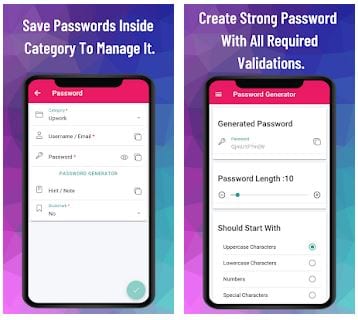 Categories will help you store your data in the appropriate place, such as saving Netflix username and password in the Entertainment category, not in Work (if you do not work in Netflix of course).
One of the best features of the Password Manager is a Password Generator tool. Sure, there is a possibility to create a password manually, if you wish.
If someone is still trying to get to your apps, you can hide them – check out this article.
If you have any questions while using the app, you can find FAQ and other helpful functions, such as contacting tech support in the main menu icon top left.
Categories will help you store your data in the appropriate place, such as saving Netflix username and password in the Entertainment category, not in Work (if you do not work in Netflix of course).
One of the best features of the Password Manager is a Password Generator tool. Sure, there is a possibility to create a password manually, if you wish.
If someone is still trying to get to your apps, you can hide them – check out this article.
If you have any questions while using the app, you can find FAQ and other helpful functions, such as contacting tech support in the main menu icon top left.
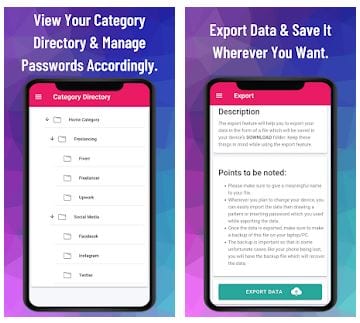 What gives the Password Manager an advantage over other apps is working offline. The second one is that you can export or import your data, saved by Password Manager, to the other device via Bluetooth. It is useful in case if you bought a new phone, for example.
For those who want to get super secured from the intruders (aka too jealous boyfriend or girlfriend) you can use the apps to fake the conversations.
To sum up, you have just read about one of the best password managers. Password Manager stores your data without using the internet (it means full safety), it helps you sort your data, generate it, and carefully move it to the other device. What else is needed? If you try Password Manager, we promise, you will never need another one.
What gives the Password Manager an advantage over other apps is working offline. The second one is that you can export or import your data, saved by Password Manager, to the other device via Bluetooth. It is useful in case if you bought a new phone, for example.
For those who want to get super secured from the intruders (aka too jealous boyfriend or girlfriend) you can use the apps to fake the conversations.
To sum up, you have just read about one of the best password managers. Password Manager stores your data without using the internet (it means full safety), it helps you sort your data, generate it, and carefully move it to the other device. What else is needed? If you try Password Manager, we promise, you will never need another one.

List of reviewed apps:
Key Features
- Secure password storage with multiple authentication options (pattern, password, or fingerprint)
- Built-in password generator to create strong, unique passwords automatically
- Organize passwords into custom categories for easy management
- Additional notes section for storing sensitive information beyond just passwords
- Multi-language support with 12 available languages
Pros and Cons
- Pros: No registration required, intuitive interface, biometric authentication option, comprehensive security features
- Cons: Simple interface may lack advanced features for power users, limited customization options
Bottom Line
If you’re tired of using post-it notes as a password vault and want a straightforward, no-nonsense solution, Password Manager app is worth downloading. It’s perfect for anyone looking to upgrade their digital security without dealing with complicated setups or mandatory account creation.