 Let’s start with the main thing: Planes Control does not require registration, and it’s free. But you will also have to install the Google Play Game application (if you do not already have it) and select the Google account to which the application will be linked.
Then click on the Planes Control icon, and you can start! No more actions needed. Agree that this is very nice.
Another interesting article that we recommend to read if you like this app is the home decorating games – express your personality and creativity!
First, Planes Control is designed for horizontal screen orientation. The color scheme is charming, with a sky-blue background and white font. The game’s home screen greets you with a large orange play button that you cannot miss. Below you can see four small white icons: Rating, Tournaments, Shop, and Settings (language, game sounds, etc.)
The settings also contain an EDUCATIONAL TUTORIAL (just in case), as well as information about the creators of the application and the game itself. Conveniently, you can write to the technical support in the same settings, get to Twitter or Facebook of Planes Control (there are buttons in the upper right corner).
Let’s start with the main thing: Planes Control does not require registration, and it’s free. But you will also have to install the Google Play Game application (if you do not already have it) and select the Google account to which the application will be linked.
Then click on the Planes Control icon, and you can start! No more actions needed. Agree that this is very nice.
Another interesting article that we recommend to read if you like this app is the home decorating games – express your personality and creativity!
First, Planes Control is designed for horizontal screen orientation. The color scheme is charming, with a sky-blue background and white font. The game’s home screen greets you with a large orange play button that you cannot miss. Below you can see four small white icons: Rating, Tournaments, Shop, and Settings (language, game sounds, etc.)
The settings also contain an EDUCATIONAL TUTORIAL (just in case), as well as information about the creators of the application and the game itself. Conveniently, you can write to the technical support in the same settings, get to Twitter or Facebook of Planes Control (there are buttons in the upper right corner).
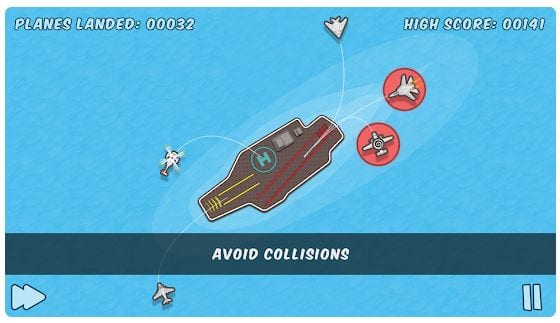 Secondly, in Planes Control, you can choose locations and even situations, such as “resort” and “aircraft carrier”. While playing, you have to put out forest fires, attack opponents, get out of tornadoes, and even fight aliens! There are 12 levels in total and over 60 aircraft models.
This game looks really cute and fun. Do you like a style like this? You should also check out the list of the games like Huniepop.
Do you know what makes Planes Control UNIQUE? No ads while you are playing! Developers care about their users. To summarize, Planes Control is an excellent game for when you want to stretch your brain and have fun, having only your fingers and a smartphone. We definitely recommend it!
Secondly, in Planes Control, you can choose locations and even situations, such as “resort” and “aircraft carrier”. While playing, you have to put out forest fires, attack opponents, get out of tornadoes, and even fight aliens! There are 12 levels in total and over 60 aircraft models.
This game looks really cute and fun. Do you like a style like this? You should also check out the list of the games like Huniepop.
Do you know what makes Planes Control UNIQUE? No ads while you are playing! Developers care about their users. To summarize, Planes Control is an excellent game for when you want to stretch your brain and have fun, having only your fingers and a smartphone. We definitely recommend it!


List of reviewed apps:
Key Features
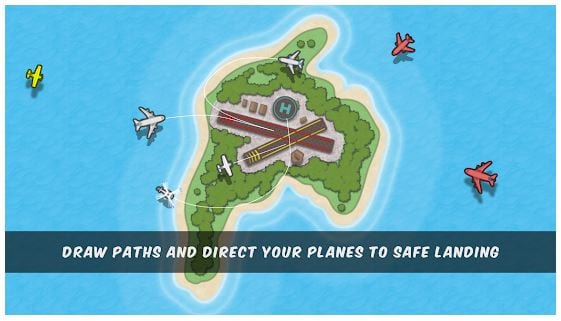
- Draw flight paths with your finger to guide planes and helicopters safely to landing
- Multiple levels with increasing difficulty to test your air traffic control skills
- Colorful arcade-style graphics that make the gameplay visually appealing
- Free to play with no account registration required
- Google Play Games integration for tracking achievements and competing with friends
Pros and Cons
- Pros:
- Easy to pick up and play — intuitive finger controls make it accessible to all ages
- Great for quick gaming sessions when you need a mental break or something relaxing
- Genuinely addictive gameplay that keeps you coming back for “just one more level”
- Cons:
- Can become repetitive after extended play sessions
- Difficulty spikes may frustrate casual players without a difficulty curve
Bottom Line
If you enjoy puzzle games that require quick thinking and steady hands, Planes Control is absolutely worth downloading. It’s the perfect app for anyone looking to sharpen their multitasking skills while having fun, and best of all, it won’t cost you a penny.