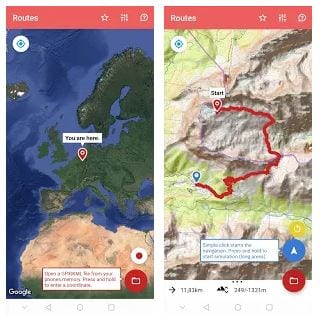
 When you open the app, you immediately see the map and your location on it. There are two buttons in the lower-left corner. The first one is Route Record. Use this function to save your route for the future.
Track not only your hiking paths but also when your friends were seen last time on social media – check out our list of apps for that!
With Routes, you can load routes from other portals in GPX or KML format to the navigator. Routs will read them and walk you through them. To load GPX or KML files, use the Folder icon in the lower right corner of the screen.
When you open the app, you immediately see the map and your location on it. There are two buttons in the lower-left corner. The first one is Route Record. Use this function to save your route for the future.
Track not only your hiking paths but also when your friends were seen last time on social media – check out our list of apps for that!
With Routes, you can load routes from other portals in GPX or KML format to the navigator. Routs will read them and walk you through them. To load GPX or KML files, use the Folder icon in the lower right corner of the screen.
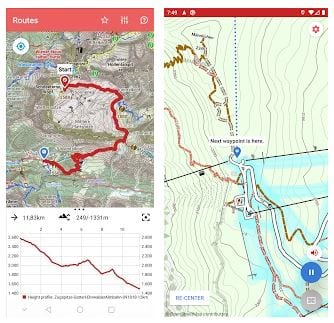 To explore the environment, you can use offline and online maps. If you prepare your travel, get an overview of the area by running the online simulation. For more detailed settings and technical support, use the Settings icon top right.
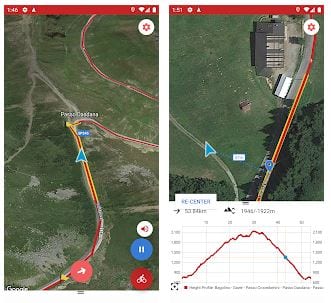 The design of Routes is intuitive and straightforward. Everything you need in navigators is at hand. The application works in both vertical and horizontal screen orientation.
This app might also be useful to track the paths of your unfaithful boyfriend/girlfriend. In order to be more equipped, use the apps to catch cheaters.
To sum up, Routes captivates with its minimalistic interface and functionality. If you appreciate the convenience and ease of use, then the Routes app is definitely CREATED FOR YOU!
The design of Routes is intuitive and straightforward. Everything you need in navigators is at hand. The application works in both vertical and horizontal screen orientation.
This app might also be useful to track the paths of your unfaithful boyfriend/girlfriend. In order to be more equipped, use the apps to catch cheaters.
To sum up, Routes captivates with its minimalistic interface and functionality. If you appreciate the convenience and ease of use, then the Routes app is definitely CREATED FOR YOU!

List of reviewed apps:
Key Features
- GPX and KML file support — load and navigate routes from external sources
- Background tracking — keep the app running while your phone stays in your pocket
- GPS alerts — get notified with sound signals if you stray off course
- Route recording — capture and save your own paths for future reference
- Offline-friendly navigation — no registration or constant internet required
Pros and Cons
- Pro: Completely free with zero ads cluttering your screen
- Pro: Privacy controls let you hide your GPS location when needed
- Pro: Background operation is perfect for cyclists, hikers, and casual wanderers
- Con: No built-in social features for sharing routes with friends in real-time
- Con: Limited to GPX/KML formats — may require conversion for other route file types
Bottom Line
If you’re an outdoor enthusiast who regularly explores new trails or relies on pre-planned routes, Routes is a solid, no-frills navigation companion. Download it for worry-free hiking, biking, or road trips without the bloat of ads or forced accounts.