 You can download the app absolutely for free on your tablet or phone in Google Play and App Store. The first thing you will notice is the catchy and attractive design of the app with the cosmic interface. On the screen, there will be a Solar system, where each planet corresponds to a year of learning.
Don’t forget to take pictures of your kids when you’re learning! For this purpose – check out the list of baby photo editing apps.
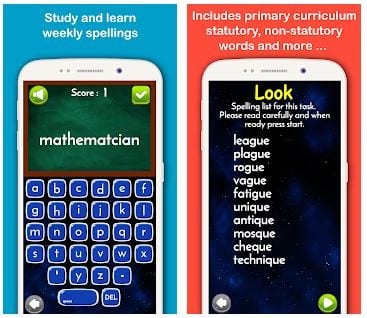
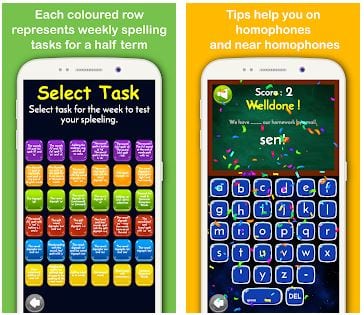
Enable or disable sound and tip in the Settings. Click sooner on the rocket and start studying! Studying in each year includes 36 topics. The app has weekly spelling lists grouped in colored lines for half term. Memorize words from the group by reading them, practice spelling by ear by pressing the virtual keyboard.
You can download the app absolutely for free on your tablet or phone in Google Play and App Store. The first thing you will notice is the catchy and attractive design of the app with the cosmic interface. On the screen, there will be a Solar system, where each planet corresponds to a year of learning.
Don’t forget to take pictures of your kids when you’re learning! For this purpose – check out the list of baby photo editing apps.
Enable or disable sound and tip in the Settings. Click sooner on the rocket and start studying! Studying in each year includes 36 topics. The app has weekly spelling lists grouped in colored lines for half term. Memorize words from the group by reading them, practice spelling by ear by pressing the virtual keyboard.
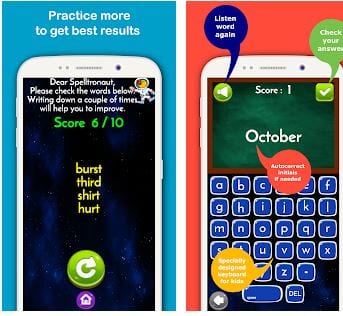
 If you answer correctly, you will see a beautiful animation with a greeting, and if you have any difficulties-do not worry, you can listen to the word again or repeat the program on this topic. Your child will not be bored at such classes! The app is guaranteed to help you master the school curriculum. The app will also be useful for those parents who want to learn English.
In addition to improving spelling, the app forms the habit of practicing every day, expands vocabulary, and improves audio-visual perception. The correct voiceover of words will build the correct pronunciation.
If you answer correctly, you will see a beautiful animation with a greeting, and if you have any difficulties-do not worry, you can listen to the word again or repeat the program on this topic. Your child will not be bored at such classes! The app is guaranteed to help you master the school curriculum. The app will also be useful for those parents who want to learn English.
In addition to improving spelling, the app forms the habit of practicing every day, expands vocabulary, and improves audio-visual perception. The correct voiceover of words will build the correct pronunciation.
 You can also check out the websites which help you to generate the face of your future baby.
Classes are not limited in time, practice as much as you need. The Deedy Duck development team is always in touch with users and is ready to answer questions. Updates with new interesting tasks are released regularly. Spelltronaut is definitely a high-quality and efficient tool! Enjoy the studying process!
You can also check out the websites which help you to generate the face of your future baby.
Classes are not limited in time, practice as much as you need. The Deedy Duck development team is always in touch with users and is ready to answer questions. Updates with new interesting tasks are released regularly. Spelltronaut is definitely a high-quality and efficient tool! Enjoy the studying process!


List of reviewed apps:
Key Features
- Gamified spelling lessons structured around a Solar System interface with planets representing different learning levels
- 36 spelling topics per year with weekly word lists organized by color-coded half-term groups
- Curriculum aligned with government English language program guidelines
- Interactive learning designed to boost focus, attention span, and memory retention
- Customizable settings to toggle sound effects and hint assistance on or off
Pros and Cons
- Pros: Completely free to download on iOS and Android; visually engaging cosmic theme keeps kids motivated; structured curriculum removes guesswork from what to study
- Cons: Limited to primary-level spelling (may not challenge older students); cosmic interface is fun but doesn’t fundamentally change the core spelling practice activity
Bottom Line
If you’re looking for a free, curriculum-friendly way to make spelling practice feel less like a chore and more like a space adventure, Spelltronaut is worth downloading. It’s ideal for primary school students who need structured spelling support and respond well to game-based learning—just don’t expect it to turn spelling into the next big gaming sensation.