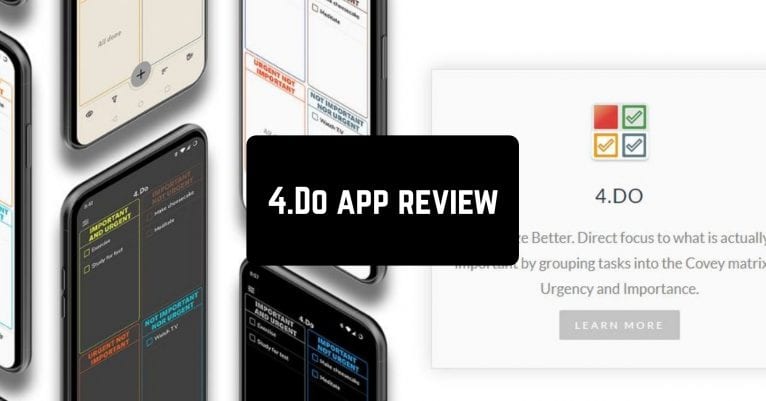
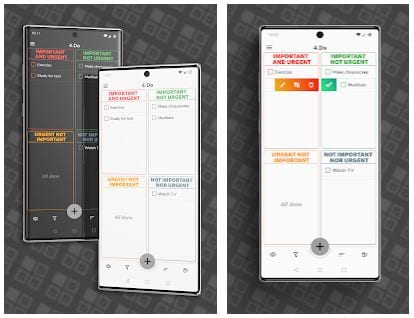
 After a quick setup you will see the main display with 4 sections: Important and Urgent, Important not Urgent, Urgent not Important, Not Important Nor Urgent. You can choose efficiently which tasks you should do first and what can wait.
By tapping on a + icon down you are able to add the task, choose its category, due date, and of course set a reminder. 4.Do Planner will not let you forget anything.
The customization is also available in the Settings, create your own theme, add the filters that you need, back it up, restore from Google Drive. Also, you can set tasks to repeat at the preferred time interval – daily, weekly, monthly, or yearly.
After a quick setup you will see the main display with 4 sections: Important and Urgent, Important not Urgent, Urgent not Important, Not Important Nor Urgent. You can choose efficiently which tasks you should do first and what can wait.
By tapping on a + icon down you are able to add the task, choose its category, due date, and of course set a reminder. 4.Do Planner will not let you forget anything.
The customization is also available in the Settings, create your own theme, add the filters that you need, back it up, restore from Google Drive. Also, you can set tasks to repeat at the preferred time interval – daily, weekly, monthly, or yearly.
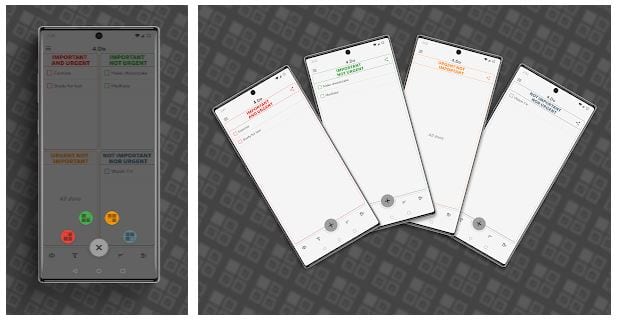 There is a great home widget that provides you with instant access to your to-do list. Each and every section is seen on the home screen of your phone. The reminders are quite fun as well. Configure the sound, vibration, LED, and snooze length easily.
Their tech support is a fantastic team. Any time of the day they are ready to answer any of your questions. If you have difficulty using the app they will tell you the steps in detail. They don’t ignore anything and take everything into consideration.
Using 4.Do Planner is a great experience. We haven’t seen the app yet that allows categorizing the tasks the same way. If you are looking for efficient time-management we strongly recommend you to download it.
There is a great home widget that provides you with instant access to your to-do list. Each and every section is seen on the home screen of your phone. The reminders are quite fun as well. Configure the sound, vibration, LED, and snooze length easily.
Their tech support is a fantastic team. Any time of the day they are ready to answer any of your questions. If you have difficulty using the app they will tell you the steps in detail. They don’t ignore anything and take everything into consideration.
Using 4.Do Planner is a great experience. We haven’t seen the app yet that allows categorizing the tasks the same way. If you are looking for efficient time-management we strongly recommend you to download it.

List of reviewed apps:
Key Features
- Eisenhower Matrix organization — prioritize tasks by urgency and importance across four quadrants
- Smart task creation with due dates, reminders, and category assignment
- Recurring task scheduling — set tasks to repeat daily, weekly, monthly, or yearly
- Home widget for quick access to your to-do list at a glance
- Cloud backup and restore via Google Drive, plus custom themes and filters
Pros and Cons
- Pros:
- The four-quadrant system actually works for deciding what matters most (no more decision paralysis)
- Clean, distraction-free interface that won’t overwhelm you with unnecessary features
- Flexible customization options let you make the app feel like yours
- Cons:
- The Eisenhower Matrix approach might feel limiting if you prefer a simpler, flat task list
- Heavy reliance on reminders means you’ll need to set them properly or tasks can slip through the cracks
Bottom Line
If you’re the type who spends more time organizing your to-do list than actually tackling tasks, 4.Do Planner is your answer. Download it to finally figure out what actually matters and stop spinning your wheels on low-priority busywork.