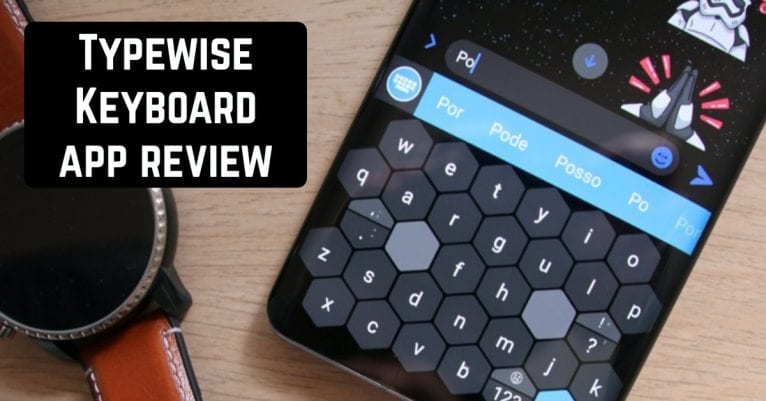
 The Typewise Keyboard application is a great solution for those who want to improve their smartphone usage.
When you first launch the application, you will see several windows with information. Note that at the top of the window you can connect a pro version for a whole month for free and use absolutely all the features of the application.
At the very beginning, you will be offered a tutorial on the application. You can continue to use the free version of the app or choose a trial period, which, as we wrote before, is also completely free.
The app will let you know that it is completely confidential. It does not need an Internet connection, which means that your data will not be sent to servers. In the tutorial window, the application will tell you how to connect the application’s keyboard.
By the way, the key on the application’s keyboard looks like a pentagon cell. This is very unusual. But you can also choose a standard type of keyboard. Then you will be shown some of your likes. For example, how to write with two fingers at the same time.
To make a capital letter, you need to pull it up. There are many interesting features that make the keyboard easier to use. You will recognize them as you go through the tutorial.
The Typewise Keyboard application is a great solution for those who want to improve their smartphone usage.
When you first launch the application, you will see several windows with information. Note that at the top of the window you can connect a pro version for a whole month for free and use absolutely all the features of the application.
At the very beginning, you will be offered a tutorial on the application. You can continue to use the free version of the app or choose a trial period, which, as we wrote before, is also completely free.
The app will let you know that it is completely confidential. It does not need an Internet connection, which means that your data will not be sent to servers. In the tutorial window, the application will tell you how to connect the application’s keyboard.
By the way, the key on the application’s keyboard looks like a pentagon cell. This is very unusual. But you can also choose a standard type of keyboard. Then you will be shown some of your likes. For example, how to write with two fingers at the same time.
To make a capital letter, you need to pull it up. There are many interesting features that make the keyboard easier to use. You will recognize them as you go through the tutorial.
List of reviewed apps:
Settings
After passing the tutorial, you will be able to choose the keyboard language. The choice is very large, so the application will suit any user anywhere in the world. You can also adjust settings such as smart bar, themes, auto-correction, auto space, shortcut, custom accents, vibration, text replacement, and more.Game
The developers of this application did not stop only at the creation of the multifunction keyboard. They also added a game to the application that will help you learn to write faster. The application will redirect you to its website, where you can enjoy this game and get useful skills.
 The Typewise Keyboard is a great keyboard with a nice addition as a game to improve your writing skills. This app has no drawbacks, as shown by a large number of positive reviews on Google Play. Try it for yourself and see for yourself how perfect it is.
 You may also like: 21 Best keyboard apps for Android & iOS
Key Features
- Hexagonal key layout option for faster, more accurate typing with reduced fat-finger errors
- Standard QWERTY keyboard mode for users who prefer traditional layouts
- Offline functionality — no internet connection required, keeping your typing data completely private
- Customizable keyboard themes and appearance to match your personal style
- Smart autocorrect and word prediction to speed up your typing workflow
Pros and Cons
- Pros: Privacy-focused design with no data transmission to servers; generous free trial of premium features; unique hexagonal layout reduces typing mistakes for those willing to learn it
- Cons: The unconventional pentagon/hexagonal key layout has a steep learning curve; free version may lack some customization options available in the pro version
Bottom Line
Typewise Keyboard is ideal for users frustrated with standard phone keyboards who are willing to invest time learning a new layout in exchange for improved accuracy and privacy. If you type frequently and value data confidentiality, the free trial makes it worth testing before committing to the premium version.