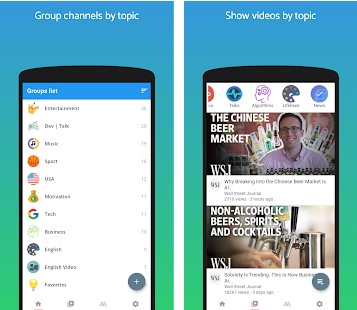
 PocketTube is a web service and extension that allows you to create categories for your subscriptions and sort them according to different criteria. The tool is available in the form of extensions for Chrome and Firefox browsers, as well as applications for Apple iOS and Android.
After installing the extension on the sidebar of YouTube on the left you will have a new section “Subscription Groups”, if suddenly this does not happen immediately, restart your web browser.
To create a group, enter its name in the block text box and click the plus sign. This way you can create as many subject categories as you want. It is just as simple to add a channel to one or another group.
PocketTube is a web service and extension that allows you to create categories for your subscriptions and sort them according to different criteria. The tool is available in the form of extensions for Chrome and Firefox browsers, as well as applications for Apple iOS and Android.
After installing the extension on the sidebar of YouTube on the left you will have a new section “Subscription Groups”, if suddenly this does not happen immediately, restart your web browser.
To create a group, enter its name in the block text box and click the plus sign. This way you can create as many subject categories as you want. It is just as simple to add a channel to one or another group.
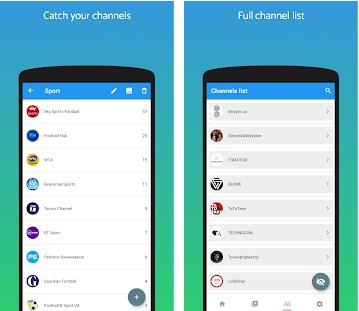 Open the channel page and click the plus sign next to the bell, – a drop-down list of the groups you created will appear immediately, click the appropriate group and the channel will be immediately added to it.
The created groups can be expanded and collapsed, sorted by newness, alphabet, the total number of subscribers to their channels, and the block itself can be moved to the upper or lower area of the sidebar by clicking the impromptu arrow buttons at the bottom of the block.
And for downloading YouTube videos, explore this article.
There are also global settings in PocketTube, where you can set the appearance and behavior of the extension, for example, enable synchronization with your Google account, thus insuring yourself against the consequences of a browser failure or reinstallation.
Open the channel page and click the plus sign next to the bell, – a drop-down list of the groups you created will appear immediately, click the appropriate group and the channel will be immediately added to it.
The created groups can be expanded and collapsed, sorted by newness, alphabet, the total number of subscribers to their channels, and the block itself can be moved to the upper or lower area of the sidebar by clicking the impromptu arrow buttons at the bottom of the block.
And for downloading YouTube videos, explore this article.
There are also global settings in PocketTube, where you can set the appearance and behavior of the extension, for example, enable synchronization with your Google account, thus insuring yourself against the consequences of a browser failure or reinstallation.
List of reviewed apps:
Key Features
- Create custom subscription groups to organize channels by topic, genre, or any category you prefer
- Drag-and-drop functionality to easily move channels between different groups
- Available as browser extensions for Chrome and Firefox, plus native apps for iOS and Android
- Seamlessly integrates with YouTube’s sidebar for quick access to your organized subscriptions
- Sync your subscription groups across multiple devices
Pros and Cons
- Pro: Solves a real problem that Google abandoned years ago—finally, subscription management that doesn’t make you want to scream
- Pro: Simple, intuitive interface that doesn’t require a PhD in tech to figure out
- Pro: Works across multiple platforms, so you’re covered whether you’re on desktop or mobile
- Con: Relies on third-party service rather than native YouTube support, which could change at any time
- Con: Browser extension performance may vary depending on your internet connection and device
Bottom Line
If you’re subscribed to more than a handful of YouTube channels and can’t find anything to watch, PocketTube is your answer. It’s essential for anyone who takes their YouTube subscriptions seriously and wants to actually organize them into something manageable. Download it and reclaim your sanity.