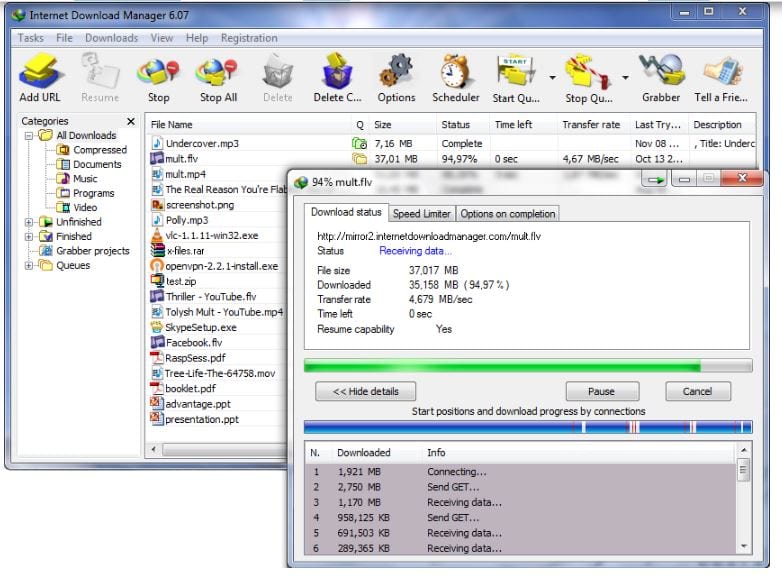
 Unlike other download accelerators, Internet Download Manager divides the downloaded file into file segments. When the connections finish downloading the segments, it will assemble all segments in one file.
Internet Download Manager allows you to resume the interrupted downloads from the place they stopped. The program will restart unfinished downloading due to network issues, lost connections, and so on.
Internet Download Manager contains an Automatic Antivirus checking option. The program can automatically launch a scanner to prevent users from viruses and harmful files.
Unlike other download accelerators, Internet Download Manager divides the downloaded file into file segments. When the connections finish downloading the segments, it will assemble all segments in one file.
Internet Download Manager allows you to resume the interrupted downloads from the place they stopped. The program will restart unfinished downloading due to network issues, lost connections, and so on.
Internet Download Manager contains an Automatic Antivirus checking option. The program can automatically launch a scanner to prevent users from viruses and harmful files.
 The program supports proxy servers – it ideally works with Microsoft ISA and FTP. Plus, the program is compatible with all versions of popular browsers – Mozilla, Firefox, AOL, Chrome, MSN, and others. So, you can integrate IDM into any Internet application.
Moving on, Internet Download Manager installs all files specified with filters from websites. You can even schedule multiple grabber projects to launch them at a particular time, stop, and periodically run to synchronize the changes.
In order to download more interesting video files, you can check out the profiles of your friends’ social media. You can even find the social media of people who never shared it – using these apps.
Internet Download Manager boasts a straightforward graphic interface. The installation process is quite quick and simple. The program does not slow down.
The program supports proxy servers – it ideally works with Microsoft ISA and FTP. Plus, the program is compatible with all versions of popular browsers – Mozilla, Firefox, AOL, Chrome, MSN, and others. So, you can integrate IDM into any Internet application.
Moving on, Internet Download Manager installs all files specified with filters from websites. You can even schedule multiple grabber projects to launch them at a particular time, stop, and periodically run to synchronize the changes.
In order to download more interesting video files, you can check out the profiles of your friends’ social media. You can even find the social media of people who never shared it – using these apps.
Internet Download Manager boasts a straightforward graphic interface. The installation process is quite quick and simple. The program does not slow down.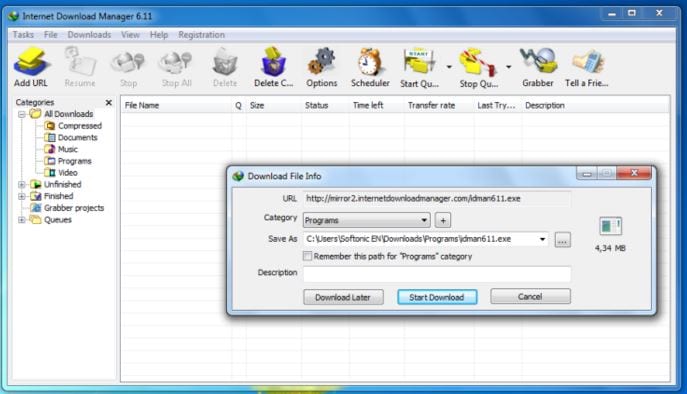 Moreover, you can adjust the main IDM window – choose a preferable order, buttons, and columns. On the home website, users can download various skins or create their own ones.
You should also check our list of the best apps for IPTV. Maybe you will find interesting videos there and will want to download them as well?
In summary, Internet Download Manager is a full-featured program that truly worth trying. This is a must-have tool for everyone who does not want to waste time while long loading.
Moreover, you can adjust the main IDM window – choose a preferable order, buttons, and columns. On the home website, users can download various skins or create their own ones.
You should also check our list of the best apps for IPTV. Maybe you will find interesting videos there and will want to download them as well?
In summary, Internet Download Manager is a full-featured program that truly worth trying. This is a must-have tool for everyone who does not want to waste time while long loading.
List of reviewed apps:
Key Features
- Download acceleration up to 5x faster through intelligent file segmentation
- One-click downloading directly from browser with no registration required
- Support for multiple protocols including HTTP, FTP, HTTPS, and MMS
- Resume capability for interrupted downloads from where they left off
- Built-in antivirus scanning to protect against malicious files
Pros and Cons
- Pros:
- Significantly speeds up downloads through parallel connections and file segmentation
- Simple, user-friendly interface that works seamlessly with your browser
- Reliable recovery from network interruptions saves time and frustration
- Cons:
- Works best with stable internet connections; effectiveness varies on slower networks
- May require system resources that could impact overall computer performance
Bottom Line
Internet Download Manager is ideal for anyone who regularly downloads large files and wants to save time without the hassle of complicated settings. If you’re tired of staring at progress bars and dealing with failed downloads, IDM’s straightforward approach and speed boost make it worth trying.