 It’s suitable for absolutely anyone, for personal use, without the intention of receiving commercial gain or monetary compensation. Undoubtedly, the pleasant fact is that this software is FREE. And now for the most basic functions:
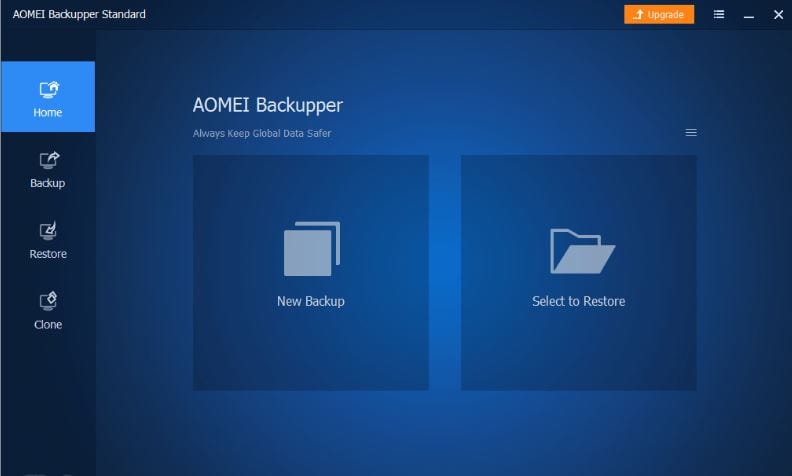
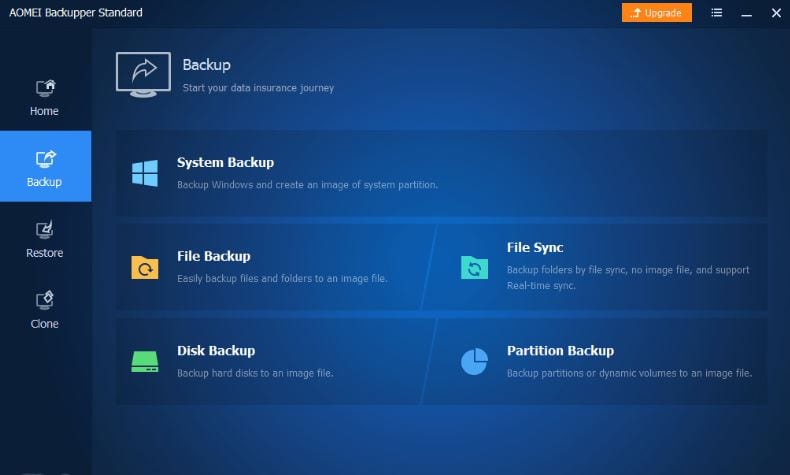
1) backup: it includes system backup, file backup, disk backup, partition/volume backup, automatic/schedule backup, incremental and differential backup, and file sync.
2) restore and clone: system restore, file restore, disk restore and partition restore, selective files restore, disk clone, partition/volume clone.
3) It also has the other tools: explorer and checks image, creates bootable rescue media, export/import, and logs, email Notifications compress, recovery environment, intelligent backup, comment, and edit.
It’s suitable for absolutely anyone, for personal use, without the intention of receiving commercial gain or monetary compensation. Undoubtedly, the pleasant fact is that this software is FREE. And now for the most basic functions:
1) backup: it includes system backup, file backup, disk backup, partition/volume backup, automatic/schedule backup, incremental and differential backup, and file sync.
2) restore and clone: system restore, file restore, disk restore and partition restore, selective files restore, disk clone, partition/volume clone.
3) It also has the other tools: explorer and checks image, creates bootable rescue media, export/import, and logs, email Notifications compress, recovery environment, intelligent backup, comment, and edit.
 And some words about tech specs:
- Operating systems: You can use this software if you have the next generations of Windows installed on your device:10/8.1/8/7/XP/Vista. That is, as you can see, it fits almost all computers.
- File Systems: It’s possible to work with absolutely any file system (NTFS, FAT32, FAT16, EXT2, EXT3, and other file systems).
- Storage Device: The choice for this item is also great (Internal hard disks, external hard drives, solid-state drive (SSD), USB flash drives, thumb drives, pen drives, CD/DVD, network share, network-attached storage (NAS), cloud drive desktop apps, Hardware RAID and Virtual machine systems, etc.).
 Given these three characteristics, it becomes clear that the product is suitable for absolutely everyone. I also want to note that the last update was released on January 28, 2021. And according to the site statistics, they regularly improve their software. I can’t help saying that, but more than 50,000,000 active users are already using this software, and they leave only positive feedback.
The software can be purchased in 3 options:
Given these three characteristics, it becomes clear that the product is suitable for absolutely everyone. I also want to note that the last update was released on January 28, 2021. And according to the site statistics, they regularly improve their software. I can’t help saying that, but more than 50,000,000 active users are already using this software, and they leave only positive feedback.
The software can be purchased in 3 options:
- Standard edition (Free(suitable for most users)
- Professional edition ($39.95)
- Workstation edition ($49.95) Summing up, there is no doubt about this product because it has huge advantages. Suitable for absolutely everyone and at the same time is Free.
List of reviewed apps:
Key Features
- Multiple backup types including system, file, disk, and partition backups to cover all your data protection needs
- Automatic and scheduled backups so you don’t have to remember to manually back up your important files
- Disk and partition cloning capabilities for quick system migrations or hardware upgrades
- Bootable rescue media creation to recover your system even if Windows won’t start
- Incremental and differential backup options to save storage space and backup time
Pros and Cons
- Pro: Completely free with no hidden costs or limitations for personal use
- Pro: User-friendly interface that doesn’t require technical expertise to navigate
- Pro: Comprehensive backup and restore options covering everything from individual files to entire disks
- Con: Free version lacks some advanced features available in paid editions
- Con: Interface could benefit from a modern redesign compared to newer backup competitors
Bottom Line
AOMEI Backupper Standard 6.4 is an excellent choice for anyone who wants solid backup protection without spending a dime. Whether you’re protecting important documents, creating system backups, or cloning your entire drive, this free software delivers professional-grade functionality for personal users who take data security seriously.