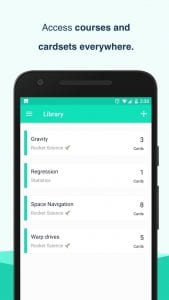
 Buffl is a service for storing courses and cards. It can be used to learn foreign languages and any other information that can be presented as these very cards.
List of reviewed apps:
Cards and courses
This application has ready-made templates for creating cards. All you have to do is add the information you need to learn. The created courses and cards will be saved in a special cloud. While learning the necessary information the application will track and save your progress. If you are preparing for exams, you can enable a speedy mode for faster preparation.Create
You can create a course or set of cards on your computer. Then you synchronize it with your mobile device, and all the necessary information appears in the application.Using
When you first launch the application, you will need to register or log in to your account if you already have one. You will then have access to the card creation mode. Here you will be able to create cards with foreign words to study, question and answer cards, and much more. The functionality of the application is so extensive that you can create the perfect tool to explore the information you need. You can also add images to each card besides text.All cards and courses can be shared with friends. They can be made publicly available to all users. You can also allow strangers to edit your cards.
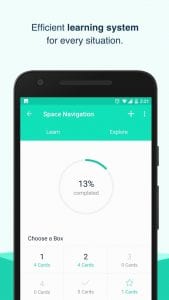 The Buffl app is useful for anyone who wants to learn a lot of information quickly. Here you can do it in an interesting way without distracting yourself from other things.
 You may also like: 11 Free Apps For College Students
Key Features
- Cloud-based storage for courses and flashcards across all your devices
- Pre-made templates to speed up card creation and organization
- Progress tracking that monitors your learning performance over time
- Speedy mode for intensive exam preparation and cramming sessions
- Rich media support including text, images, and multiple card formats (Q&A, language pairs, etc.)
Pros and Cons
- Pros:
- Seamless desktop-to-mobile synchronization means you can create cards on your computer and study anywhere
- Flexible card types make it suitable for language learning, medical studies, history facts, or pretty much anything you need to memorize
- Built-in progress tracking keeps you motivated and shows exactly what you’re conquering
- Cons:
- Another app login required—because who doesn’t love password management?
- Cloud dependency means you’ll need an internet connection to access most features
Bottom Line
Buffl is perfect for students, language learners, and anyone preparing for exams who wants a digital alternative to physical flashcards. If you’re serious about retaining information and don’t mind cloud-based learning tools, this app’s combination of flexibility, tracking, and multi-device access makes it worth downloading.