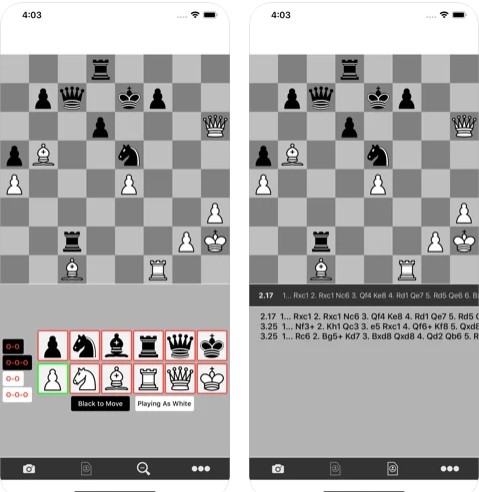
 Features:
- Table scan – scan the table of chess tournaments.
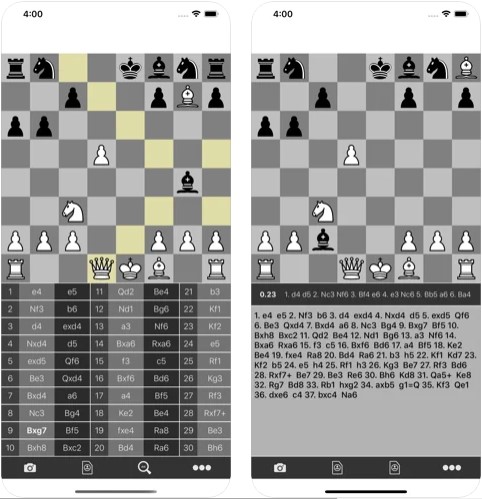
- Analysis – Allows users to analyze games in a database using a very powerful chess engine.
- Game Sharing – Allows users to share their PGN games via email with other chess players or coaches.
- Writing a PGN game – Saving scanned games as PGN on the device.
- Allows users to edit the chessboard to adjust the position for analysis.
 In this game, you can also buy a subscription to some features, but the aforementioned features are also available to users without a subscription.
By the way, invite your friends to play chess together! Use multiplayer chess apps for that.
Here are some other things that you may find in CheSScan app:
In this game, you can also buy a subscription to some features, but the aforementioned features are also available to users without a subscription.
By the way, invite your friends to play chess together! Use multiplayer chess apps for that.
Here are some other things that you may find in CheSScan app:
- CheSScan is a chessboard scan.
- You can scan the standings.
- Сomprehensible graphics and design.
List of reviewed apps:
Key Features
- Chess Board Scanning — Use your device camera to instantly capture chess positions from physical boards, eliminating tedious manual entry
- Powerful Game Analysis — Leverage advanced chess engines to evaluate your moves, identify mistakes, and discover better strategies
- PGN Game Management — Save, store, and organize your scanned games in standard PGN format for future review
- Easy Sharing — Export your analyzed games via email to share with coaches, opponents, or fellow chess enthusiasts
- Position Editing — Manually adjust the chessboard setup to analyze specific positions or what-if scenarios
Pros and Cons
- Pros:
- Saves hours of time by automating position entry instead of clicking squares manually
- Powerful analysis engine makes serious chess improvement actually accessible to casual players
- Coaches and tournament organizers get a legitimate productivity tool for their work
- Cons:
- Premium features require a subscription beyond the free tier
- Scanning accuracy depends heavily on lighting conditions and board photography technique
Bottom Line
Download CheSScan if you’re serious about improving your chess game without spending an evening manually inputting moves. Whether you’re a casual player, a tournament competitor, or a chess coach, this app transforms how you analyze and share your games. It’s the productivity hack every chess player didn’t know they needed.