Mobile phones are taking an important place in our daily lives, becoming a single switching center of the modern man. We receive text messages, mail, notifications of various services, and calls to it. Sometimes we don’t use the phone or leave it far away to do more important things or work at the computer. But, at times like these, we may miss important messages or notifications.
 Here, apps come to help you synchronize your phone with your computer and receive notifications on it. One of the best applications for this purpose is Crono. It is an Android app that is used in combination with a special extension for your browser on your computer.
As a result, you can see the notifications from your mobile device on your computer’s desktop. They will be displayed using your browser’s built-in notification system. If you receive a notification about a new message in one of your messengers, you can reply to it right on your computer.
Here, apps come to help you synchronize your phone with your computer and receive notifications on it. One of the best applications for this purpose is Crono. It is an Android app that is used in combination with a special extension for your browser on your computer.
As a result, you can see the notifications from your mobile device on your computer’s desktop. They will be displayed using your browser’s built-in notification system. If you receive a notification about a new message in one of your messengers, you can reply to it right on your computer.
Incoming calls
There is also support for notifications of incoming calls. You will not be able to answer them on your computer. But you’ll always know if you receive a call that you can’t miss. If you do not want to answer the call, you can reject it right on your computer.Clipboard sharing
It is also a convenient function to send data from the clipboard of your phone to your computer. All data is encrypted and strictly confidential. When you send data, no one can get it, because all your information is stored only on your phone and computer. As part of the free period, the Crono application offers 2400 notifications per month. This significantly exceeds the number of notifications available for other similar applications.Find your phone
You can also use this application to find your lost phone if it is within range of your computer. For example, if you put your phone in a place you’ve forgotten about, you can use a special feature that enables an audible alert on your phone. You can also view the location of your phone here if you have left it outside your apartment.Installation and synchronization
By installing the app on your phone and the extension in the browser on your computer, you will need to activate their interaction. The first time you activate the application, you will need to log in using your Gmail or Facebook profile. After that, you can test the application using a test notification. Once you’re fully synchronized, you can set up which notifications you want to receive. For example, notifications about calls, your battery, incoming messages, and more. You’ll even have a list of your apps, from which you can exclude those from which you don’t want to receive notifications.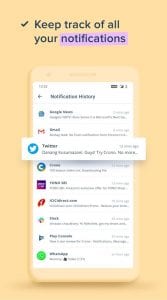
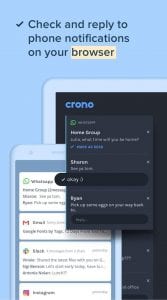 You can also configure a few extra features, such as when the notification is displayed and an audible alert to play.
With the Crono app, you can stay up to date with what’s happening on your mobile phone. This allows you to work quietly with your headphones, keep your phone in your desk or bag and not be afraid to miss an important notification.
To sum up, the Crono app is a great helper that allows you to always know what notifications come to your phone, even if it is far away from you.
You may also like: 11 Best low storage apps for Android & iOS
You can also configure a few extra features, such as when the notification is displayed and an audible alert to play.
With the Crono app, you can stay up to date with what’s happening on your mobile phone. This allows you to work quietly with your headphones, keep your phone in your desk or bag and not be afraid to miss an important notification.
To sum up, the Crono app is a great helper that allows you to always know what notifications come to your phone, even if it is far away from you.
You may also like: 11 Best low storage apps for Android & iOS
Key Features
- Real-time synchronization of notifications from your Android device to your desktop computer
- Reply to messages directly from your computer without picking up your phone
- Incoming call alerts so you never miss an important ring
- Browser-based notifications that integrate seamlessly with your existing workflow
- Requires minimal setup with just an Android app and browser extension pairing
Pros and Cons
- Pros:
- Keeps you connected to your phone while working on your computer
- Reply to messages without breaking your focus or reaching for your device
- Simple setup that doesn’t require complicated configurations
- Cons:
- Limited to Android devices only
- You’ll need to keep your browser open to receive notifications on desktop
Bottom Line
Crono is perfect for anyone who spends extended hours at their computer and wants to stay on top of their phone notifications without constant context switching. If you’re tired of missing important messages while deep in work mode, this app bridges that gap nicely and keeps your digital life organized across devices.