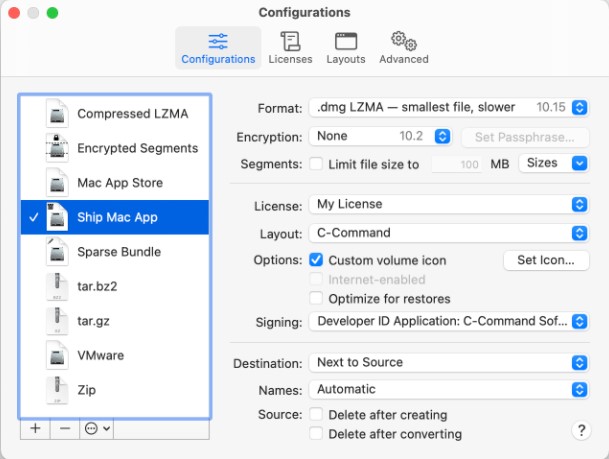
 But how should we use DropDMG? We have to admit that there is nothing difficult with this software, as it offers a very straightforward interface. So, there is no need to be very tech-savvy to find out how this tool works.
The only thing you need to do – just drag and drop a file or folder. After that, DropDMG will automatically determine what to do: create a disk image, convert to another format, join files, etc. Due to the configurations, you can use common collections of settings. But temporary options allow you to easily make one-off changes.
In DropDMG, you can easily create backups and archives, encrypt and check them for safe storage. Another interesting feature – all the users can also create mini vaults. This option helps users to protect the files with AES encryption.
But how should we use DropDMG? We have to admit that there is nothing difficult with this software, as it offers a very straightforward interface. So, there is no need to be very tech-savvy to find out how this tool works.
The only thing you need to do – just drag and drop a file or folder. After that, DropDMG will automatically determine what to do: create a disk image, convert to another format, join files, etc. Due to the configurations, you can use common collections of settings. But temporary options allow you to easily make one-off changes.
In DropDMG, you can easily create backups and archives, encrypt and check them for safe storage. Another interesting feature – all the users can also create mini vaults. This option helps users to protect the files with AES encryption.
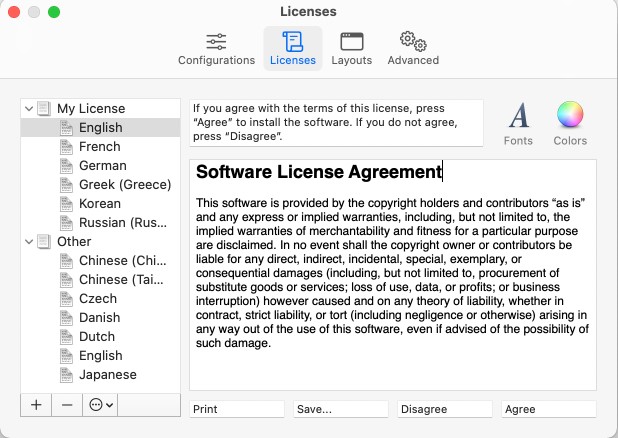 One of the best parts there – DropDMG works in the background and carries out multiple tasks simultaneously. So, the software will not distract you from working. Moving on, if you want, you can instantly record files, folders, or disk images to CD, DVD, or Blu-ray. Plus, multi-session support allows users to add files to an existing CD.
By the way, what about storing images on your Android device? If you want to hide them properly, you can check out this article and find a suitable app.
In case you have faced any technical issues while working with this tool, the developer offers a wide range of user manuals on the official website. Summarizing all the points mentioned above, DropDMG provides an excellent user experience. We have not found any significant disadvantages of this program. Highly recommended!
One of the best parts there – DropDMG works in the background and carries out multiple tasks simultaneously. So, the software will not distract you from working. Moving on, if you want, you can instantly record files, folders, or disk images to CD, DVD, or Blu-ray. Plus, multi-session support allows users to add files to an existing CD.
By the way, what about storing images on your Android device? If you want to hide them properly, you can check out this article and find a suitable app.
In case you have faced any technical issues while working with this tool, the developer offers a wide range of user manuals on the official website. Summarizing all the points mentioned above, DropDMG provides an excellent user experience. We have not found any significant disadvantages of this program. Highly recommended!
List of reviewed apps:
Key Features
- Drag-and-drop interface for creating disk images and archives without hassle
- Support for multiple formats including .dmg, .zip, .tar.gz, and .sparsebundle files
- Quick format conversion between disk images and compressed archives
- File encryption and integrity checking capabilities for secure backups
- Configurable settings with both preset and custom options for different workflows
Pros and Cons
- Pro: Extremely user-friendly with no technical expertise required
- Pro: Versatile format support makes it a one-stop tool for disk image and archive needs
- Pro: Security features like encryption add peace of mind to your backups
- Con: Limited use case if you don’t regularly work with disk images or archives
- Con: macOS-exclusive software (typical for .dmg-focused tools) limits accessibility
Bottom Line
DropDMG is perfect for Mac users who frequently create backups, share files, or work with disk images and need a straightforward tool to handle the job. If you’re tired of wrestling with format conversions or want reliable encryption for your archives, this app deserves a spot in your toolkit.