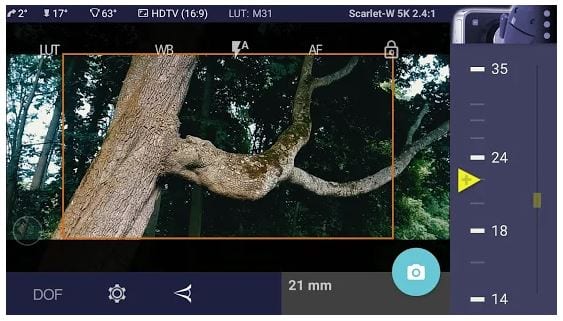
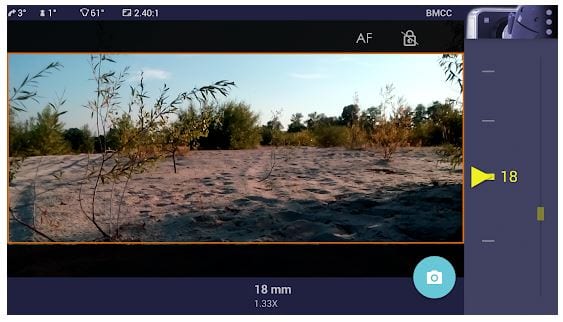
 After downloading the app you can use it straight away. The interface is very simple, you will figure it out in no time. So in the middle, you will find the shot and on the right, you will see a slider. By pressing it a focal length can be adjusted.
All the controls are spread around the frame. You can customize framings and settings from there. On the bottom left there are features of white balance, exposure, and focus. Whether you want to set it at auto or switch it to a manual mode – it is totally up to you.
After downloading the app you can use it straight away. The interface is very simple, you will figure it out in no time. So in the middle, you will find the shot and on the right, you will see a slider. By pressing it a focal length can be adjusted.
All the controls are spread around the frame. You can customize framings and settings from there. On the bottom left there are features of white balance, exposure, and focus. Whether you want to set it at auto or switch it to a manual mode – it is totally up to you.
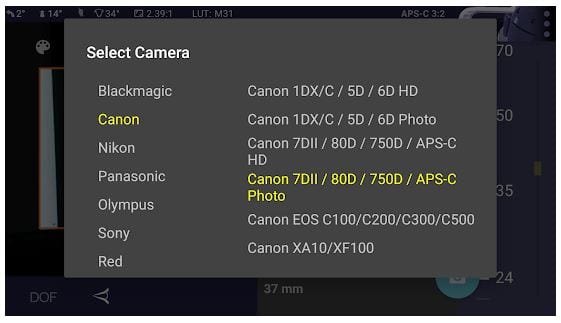 Magic Universal ViewFinder offers several frame sizes including 16:9, 4:3, 3:2, 2:40, 5:4, and 1:1. This app has built-in LUTs as well such as KDX, Teal, and many others. So if right beside the LUT button you will see another button Ref. It allows you to pick a camera and focal length, and they will be shown in your frame.
By the way, if you catch an exceptionally beautiful shot, you can add a slight painting effect to it. You don’t have to go all the way down with it, but a slight touch can really relive the picture. Check out the best apps to do that.
You can access the main menu by tapping on the right camera button. Choose your camera and let the app know what optical adapter you are using. It is full of various amazing features and available for Android and for Apple devices. There is no advertisement and the time of video recording is unlimited.
Magic Universal ViewFinder offers several frame sizes including 16:9, 4:3, 3:2, 2:40, 5:4, and 1:1. This app has built-in LUTs as well such as KDX, Teal, and many others. So if right beside the LUT button you will see another button Ref. It allows you to pick a camera and focal length, and they will be shown in your frame.
By the way, if you catch an exceptionally beautiful shot, you can add a slight painting effect to it. You don’t have to go all the way down with it, but a slight touch can really relive the picture. Check out the best apps to do that.
You can access the main menu by tapping on the right camera button. Choose your camera and let the app know what optical adapter you are using. It is full of various amazing features and available for Android and for Apple devices. There is no advertisement and the time of video recording is unlimited.
 The tech support answers very fast and they find time for every question and feedback. They are ready to help at any time with anything. We loved this app, it is just ideal for video/photo amateurs, enthusiasts, and professionals.
Besides, we prepared a list of the best cut and paste apps so you can always trim and seize your pictures.
It has so many great settings and options, we got lost in Magic Universal Viewfinder. We guarantee you will not find an app that can be better than this one.
(No longer available on the App Store)
The tech support answers very fast and they find time for every question and feedback. They are ready to help at any time with anything. We loved this app, it is just ideal for video/photo amateurs, enthusiasts, and professionals.
Besides, we prepared a list of the best cut and paste apps so you can always trim and seize your pictures.
It has so many great settings and options, we got lost in Magic Universal Viewfinder. We guarantee you will not find an app that can be better than this one.
(No longer available on the App Store)

List of reviewed apps:
Key Features
- Multiple aspect ratio options (16:9, 4:3, 3:2, 2:40, 5:4, and 1:1) for flexible framing
- Adjustable focal length slider to preview different lens perspectives
- Manual and auto controls for white balance, exposure, and focus
- Built-in LUTs for quick color grading previews
- Customizable framings and on-screen settings for real-time adjustments
Pros and Cons
- Pros: Intuitive interface that requires zero learning curve, comprehensive manual controls for serious photographers, and versatile frame options suitable for any project
- Cons: May feel feature-heavy for casual smartphone photographers just wanting a quick preview, and the slider-heavy interface takes up screen real estate
Bottom Line
Magic Universal ViewFinder is a must-download for filmmakers, photographers, and location scouts who want to nail their shots before the camera even comes out. If you’re serious about composition and planning, this app transforms your phone into a professional scouting tool—no extra gear required.