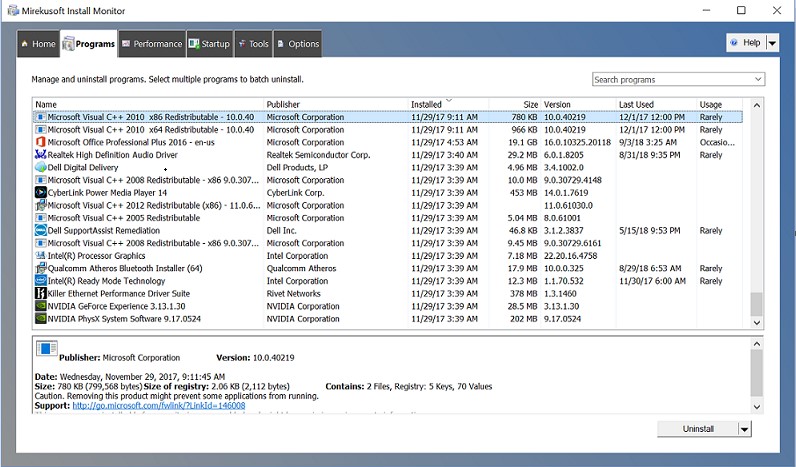
 After downloading, you will find the following sections on the top of the screen:
- Home
- Programs
- Performance
- Startup
- Tools
- Options
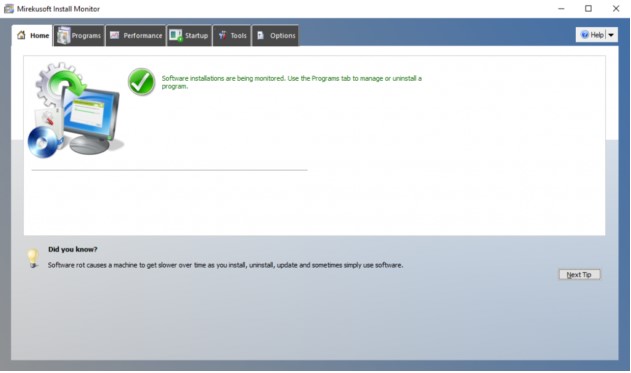 What is more, Mirekusoft Install Monitor boasts a user-friendly interface. So, even novice users will quickly understand how everything works there!
And speaking about deleted photos on Android – you can restore not only pictures but different files. Use these apps for it.
All in all, if you want to keep your PC free from junk files while using the user-friendly software you should definitely try Mirekusoft Install Monitor. We believe – you will not regret!
What is more, Mirekusoft Install Monitor boasts a user-friendly interface. So, even novice users will quickly understand how everything works there!
And speaking about deleted photos on Android – you can restore not only pictures but different files. Use these apps for it.
All in all, if you want to keep your PC free from junk files while using the user-friendly software you should definitely try Mirekusoft Install Monitor. We believe – you will not regret!
List of reviewed apps:
Key Features
- Monitor and control application resource usage across your system
- Completely uninstall programs and remove associated files and registry entries
- Scan your program list to identify unnecessary or problematic applications
- Optimize PC performance by cleaning up leftover files from uninstalled software
- Manage startup programs to improve boot times and system responsiveness
Pros and Cons
- Pros:
- Stable and reliable performance with quick installation process
- Comprehensive interface with multiple management sections (Home, Programs, Performance, Startup, Tools)
- Built-in search function makes finding specific programs effortless
- Cons:
- Registry editing tools require caution—one wrong move could cause system issues
- May overwhelm beginners with its many features and options
Bottom Line
Mirekusoft Install Monitor is ideal for Windows users who want to take full control of their installed programs and boost PC performance. If you’re tired of bloated software cluttering your system and leaving behind mysterious registry files, this tool provides a straightforward way to clean house. Just remember to proceed carefully when deleting anything—your future self will thank you.