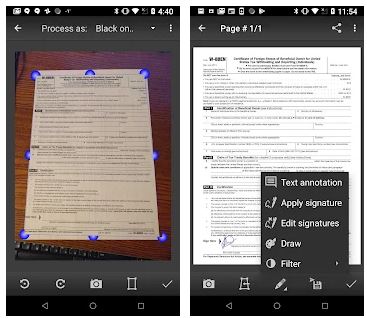
 The principle of operation is simple. Take a photo or download it from the phone’s memory. Trim it to the correct perspective. Handle it with a unique set of imaging templates and filters. Save or share your scans as JPEG images or PDF files.
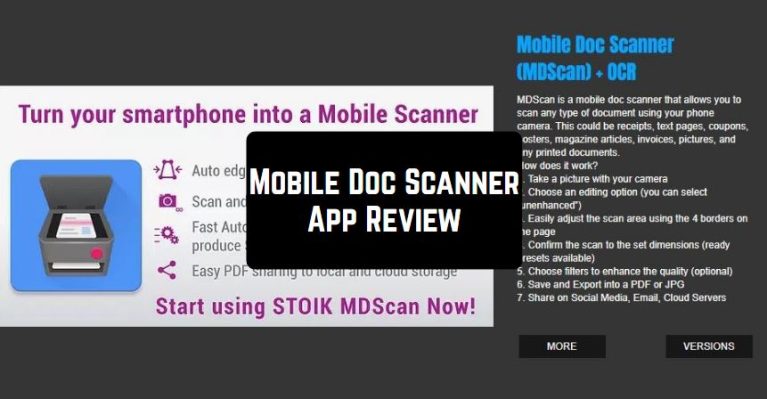
The app has its own camera interface. Supports both single and multi-page scanning modes. The major feature of the program is the templates for preprocessing and post-processing images. MDScan automatically cleans up the document by removing unnecessary elements and background. With ready-made editing templates, you can achieve a pretty decent result. From the post-processing tools, MDScan has a paintbrush and a signature.
The principle of operation is simple. Take a photo or download it from the phone’s memory. Trim it to the correct perspective. Handle it with a unique set of imaging templates and filters. Save or share your scans as JPEG images or PDF files.
The app has its own camera interface. Supports both single and multi-page scanning modes. The major feature of the program is the templates for preprocessing and post-processing images. MDScan automatically cleans up the document by removing unnecessary elements and background. With ready-made editing templates, you can achieve a pretty decent result. From the post-processing tools, MDScan has a paintbrush and a signature.
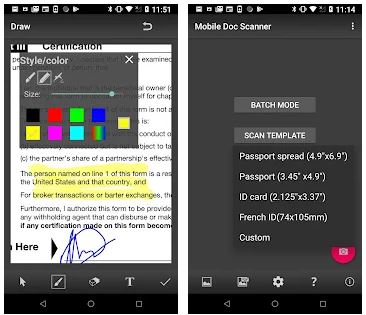 At the first start, you can see the lower control panel where the necessary tools for scanning are located. Mobile Doc Scanner is simple and intuitive to operate and does not require any specific skills to use. Mastering the process is easy. Digitized pages can merge, server, transfer to another application, or be sent to print, and the document itself can save as a ZIP and PDF file. All the above are available to the user in the free version of the application.
You can find apps not only to scan your documents but also for their fast and effective editing – in this article.
Mobile Doc Scanner is an indispensable assistant for people who are often on business trips and need to send electronic copies of documents. This application will turn your device into a real scanner. You can scan any document and easily send it to your e-mail. It is also worth noting that this program differs from its analogs by the latest photo processing algorithm, as well as the ability to create presentations.
At the first start, you can see the lower control panel where the necessary tools for scanning are located. Mobile Doc Scanner is simple and intuitive to operate and does not require any specific skills to use. Mastering the process is easy. Digitized pages can merge, server, transfer to another application, or be sent to print, and the document itself can save as a ZIP and PDF file. All the above are available to the user in the free version of the application.
You can find apps not only to scan your documents but also for their fast and effective editing – in this article.
Mobile Doc Scanner is an indispensable assistant for people who are often on business trips and need to send electronic copies of documents. This application will turn your device into a real scanner. You can scan any document and easily send it to your e-mail. It is also worth noting that this program differs from its analogs by the latest photo processing algorithm, as well as the ability to create presentations.
List of reviewed apps:
Key Features
- Multi-page document scanning with automatic perspective correction
- Advanced image filters and preprocessing templates for crisp, professional results
- Support for both JPEG and PDF export formats
- Built-in camera interface optimized for document capture
- Business card, receipt, and presentation screen scanning modes
Pros and Cons
- Pros:
- Turns your phone into a portable scanner—no desk space required
- Intelligent image enhancement automatically cleans up poor lighting and angles
- Multi-page scanning means you can digitize entire documents in one go
- Cons:
- Learning curve for mastering all the filters and templates available
- Quality depends heavily on lighting conditions and your ability to hold the phone steady
Bottom Line
If you’re drowning in paperwork and tired of hunting for a scanner, Mobile Doc Scanner is your pocket-sized lifeline. It’s perfect for business travelers, students, and anyone who needs to digitize documents on the fly without sacrificing quality.