 Using this software, you can play AVI, MPG, MPEG, MOV, ASF, and WMV video formats. This player provides various handy features such as excellent playback quality, preset equalizer, playlist editor, zip file support, etc. The most popular and convenient versions of the Passion Audio Player are 5.0, 4.0, and 3.0, judging by user reviews. Passion Audio Player is for you if your computer or laptop has 32 and 64-bit Windows OS.
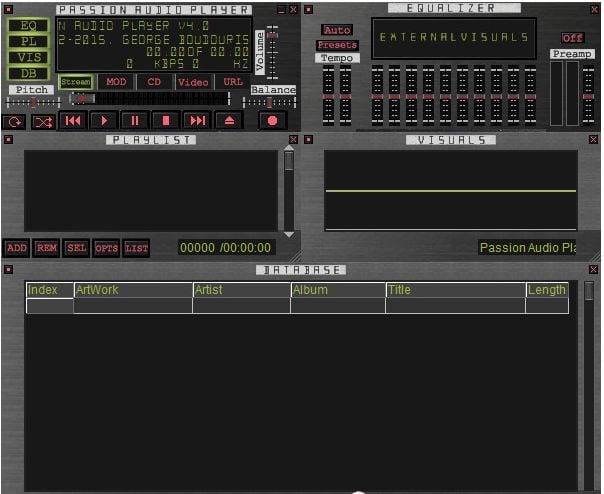
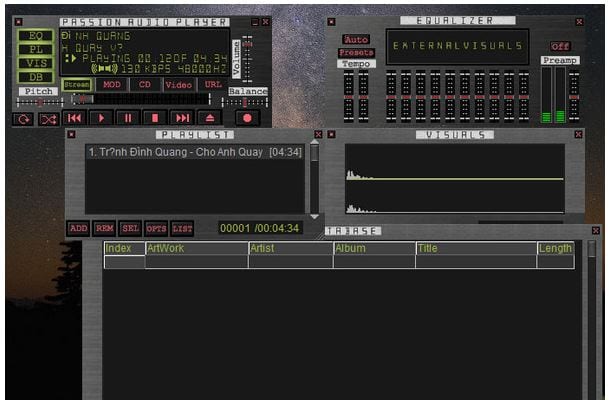 Passion Audio Player’s interface is intuitive and straightforward, making it a pleasure to use. You can add files to your playlist by dragging them or using the file browser. In general, the technique of using the player is traditional: you can stop or pause the playback, move forward or backward through the playlist, and regulate the volume.
By the way, we also have a nice recommendation for those who also like to record their voice – you should check our list of autotune apps so you could sing like a star!
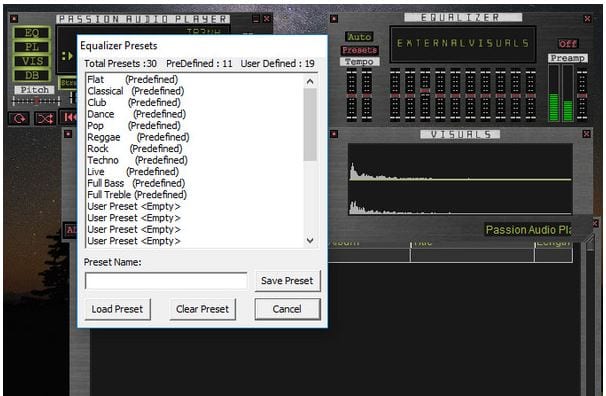
Before you start using this player, you can create your own playlist, manage and adjust it right during playback, and save it for later use. For your convenience, the player has a search if you suddenly need specific information on the title, cover art, album, and so on. Use the equalizer to customize the sound for your music genre and your preference.
Passion Audio Player’s interface is intuitive and straightforward, making it a pleasure to use. You can add files to your playlist by dragging them or using the file browser. In general, the technique of using the player is traditional: you can stop or pause the playback, move forward or backward through the playlist, and regulate the volume.
By the way, we also have a nice recommendation for those who also like to record their voice – you should check our list of autotune apps so you could sing like a star!
Before you start using this player, you can create your own playlist, manage and adjust it right during playback, and save it for later use. For your convenience, the player has a search if you suddenly need specific information on the title, cover art, album, and so on. Use the equalizer to customize the sound for your music genre and your preference.
 In addition to playing files directly from your computer, with Passion Audio Player, you can record your own audio tracks, import files from discs, or using URLs.
If you suddenly decided to change the program interface’s design, go to the “Settings” section. You can adjust the color levels, manage the plug-in, keep the application on top of other applications, minimize the player on the system bar, fine-tune sound settings, etc. All the functions of the Player make it customizable and handy in use.
Plus, if you decide not only to listen to music but, for example, watch music videos we can recommend the best apps for Hisense TV – in case you own this TV brand this list will be extremely helpful.
Passion Audio Player is an excellent and user-friendly free software for your computer.
In addition to playing files directly from your computer, with Passion Audio Player, you can record your own audio tracks, import files from discs, or using URLs.
If you suddenly decided to change the program interface’s design, go to the “Settings” section. You can adjust the color levels, manage the plug-in, keep the application on top of other applications, minimize the player on the system bar, fine-tune sound settings, etc. All the functions of the Player make it customizable and handy in use.
Plus, if you decide not only to listen to music but, for example, watch music videos we can recommend the best apps for Hisense TV – in case you own this TV brand this list will be extremely helpful.
Passion Audio Player is an excellent and user-friendly free software for your computer.

List of reviewed apps:
Key Features
- Supports a wide range of audio formats including MP3, WAV, OGG, WMA, FLAC, and more exotic ones like IT, XM, and S3M
- Video playback compatibility with AVI, MPG, MPEG, MOV, ASF, and WMV formats for all-in-one media needs
- Built-in equalizer with presets to customize your sound without needing a separate audio tool
- Playlist editor that lets you organize and arrange your media collection with ease
- Lightweight design that works seamlessly on both 32-bit and 64-bit Windows systems
Pros and Cons
- Pros: Free to download, supports tons of audio and video formats, intuitive interface that doesn’t require a learning curve
- Cons: Limited to Windows only (sorry Mac and Linux users), hasn’t received major updates in years
Bottom Line
If you’re a Windows user looking for a no-frills, lightweight media player that handles both audio and video without breaking the bank, Passion Audio Player is worth a shot. It’s perfect for anyone who values simplicity and doesn’t need fancy modern features—just reliable playback of your music and video collection.