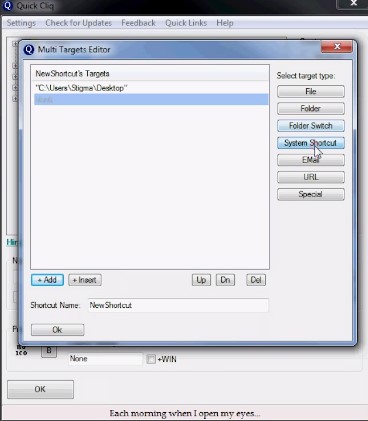
 Besides, you can also launch an unlimited number of commands from only one shortcut.
Apart from the standard copy-paste commands you can also add data to clipboards and carry out such operations as data conversion, case changes, URL retrieval, or save the clipboard to a file.
Besides, you can also launch an unlimited number of commands from only one shortcut.
Apart from the standard copy-paste commands you can also add data to clipboards and carry out such operations as data conversion, case changes, URL retrieval, or save the clipboard to a file.
 Moving on, Quick Cliq comes with a Memos option that enables users to keep their notes. They are kept as separate files in the Quick Cliq’s “Data” folder.
The next useful feature that many users will certainly like – Hide Active Window. This function enables you to hide the window, so nobody will find out what you are doing.
Just in case you might want to explore the offline browser apps – in case you want always keep the important data saved.
We have to admit that Quick Cliq is a stable tool that comes with a very convenient interface. The developer makes everything to guarantee an ultimate user experience. Highly recommended!
Moving on, Quick Cliq comes with a Memos option that enables users to keep their notes. They are kept as separate files in the Quick Cliq’s “Data” folder.
The next useful feature that many users will certainly like – Hide Active Window. This function enables you to hide the window, so nobody will find out what you are doing.
Just in case you might want to explore the offline browser apps – in case you want always keep the important data saved.
We have to admit that Quick Cliq is a stable tool that comes with a very convenient interface. The developer makes everything to guarantee an ultimate user experience. Highly recommended!
List of reviewed apps:
Key Features
- Create custom shortcuts for programs, files, folders, URLs, and command-line operations
- Launch unlimited commands from a single shortcut for maximum efficiency
- Advanced clipboard management with data conversion, case changes, and URL retrieval
- Built-in Memos feature to organize and store notes separately
- Hide Active Window function to keep your activities private from prying eyes
Pros and Cons
- Pro: Saves serious time by consolidating multiple programs and commands into one-click access
- Pro: Flexible customization options mean you can tailor shortcuts exactly to your workflow
- Pro: The clipboard tools go beyond basic copy-paste with useful conversion and formatting features
- Con: Learning curve for users unfamiliar with command-line operations
- Con: Interface could benefit from more modern design updates
Bottom Line
Quick Cliq is ideal for power users, developers, and anyone who spends their day juggling multiple programs and files. If you’re tired of digging through folders and want to reclaim precious minutes from your daily routine, this multifunctional launcher deserves a spot on your desktop.