 We have to admit that while converting and downloading songs, the software does not harm the sound quality. So, you will always have access to high-quality offline music in 320kbps!
Moving on, the program allows you to quickly sort output files by artist, album, or artist/album. Besides, you can also easily rename all the output files.
One of the best parts of this tool – it works offline. Thus, both free and premium users can enjoy music offline on any device without any restriction.
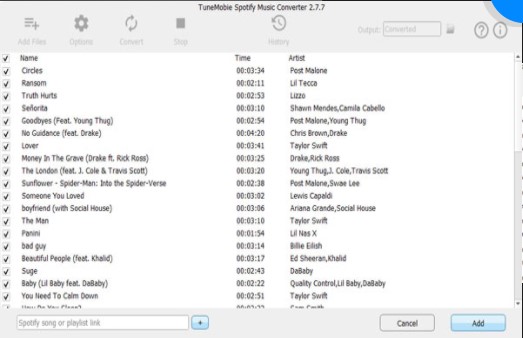
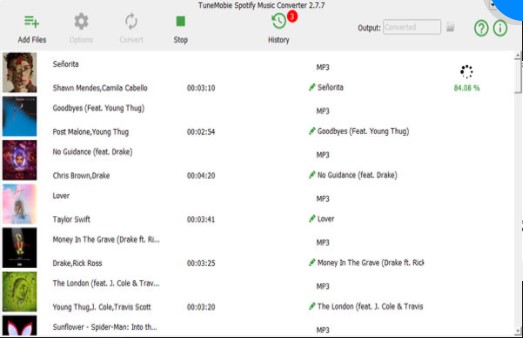
We were impressed by the modern app’s design that guarantees a user-friendly interface. So, there is no need to have professional skills to find out how everything works there.
We have to admit that while converting and downloading songs, the software does not harm the sound quality. So, you will always have access to high-quality offline music in 320kbps!
Moving on, the program allows you to quickly sort output files by artist, album, or artist/album. Besides, you can also easily rename all the output files.
One of the best parts of this tool – it works offline. Thus, both free and premium users can enjoy music offline on any device without any restriction.
We were impressed by the modern app’s design that guarantees a user-friendly interface. So, there is no need to have professional skills to find out how everything works there.
 However, in case of any difficulties, the developer offers a wide range of tutorials. Or, you can also contact very responsive customer service that works within 24 hours.
TuneMobie Music Converter comes with both versions – free and premium. If you want to get access to the advanced features, you can purchase a premium version at a very reasonable price.
As a whole, the majority of users truly like this program, as we have not found any negative feedback.
What is more, you can convert YouTube videos into Mp3 files – using these apps it’s possible.
Summarizing all the points, TuneMobie Music Converter is a must-have tool for all kinds of users. We have not found any significant disadvantages of this tool. So, hurry up to try it – we believe you will not regret!
However, in case of any difficulties, the developer offers a wide range of tutorials. Or, you can also contact very responsive customer service that works within 24 hours.
TuneMobie Music Converter comes with both versions – free and premium. If you want to get access to the advanced features, you can purchase a premium version at a very reasonable price.
As a whole, the majority of users truly like this program, as we have not found any negative feedback.
What is more, you can convert YouTube videos into Mp3 files – using these apps it’s possible.
Summarizing all the points, TuneMobie Music Converter is a must-have tool for all kinds of users. We have not found any significant disadvantages of this tool. So, hurry up to try it – we believe you will not regret!
List of reviewed apps:
Key Features
- Download entire playlists, albums, and individual tracks directly from Spotify
- Convert to multiple formats including MP3, M4A, WAV, and FLAC
- Preserve ID3 tags automatically for organized music libraries
- Batch processing capabilities for converting multiple songs at once
- Support for multiple languages to serve a global audience
Pros and Cons
- Pro: Maintains 320kbps audio quality during conversion—no sad, compressed-sounding music here
- Pro: Works offline, so both free and premium Spotify users can enjoy their music anywhere
- Pro: Clean, intuitive interface that won’t require a PhD to figure out
- Con: Requires manual setup to add songs (dragging and dropping or pasting links)
- Con: Desktop-based software means you’ll need to install it rather than accessing it from any browser
Bottom Line
TuneMobie Spotify Music Converter is ideal for music lovers who want to break free from streaming restrictions and build a personal offline library. Whether you’re tired of relying on internet connectivity or want to preserve your favorite playlists in high quality, this tool delivers a reliable solution that respects both your music taste and your audio quality standards.