- Calendar
- Library
- Messages
- Family
- More
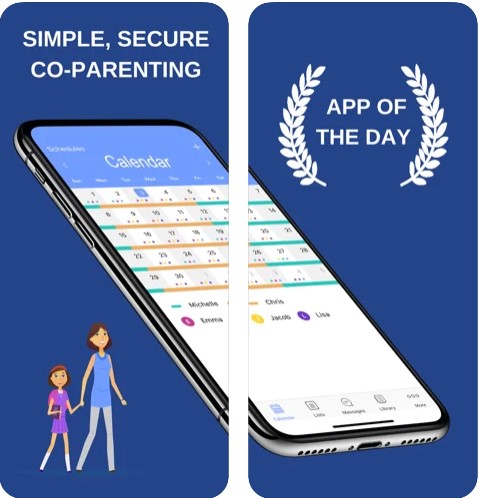 The best option of this app – it allows you to make schedules. Thus, you can plan your holidays, travel, timetable, and other things. Moreover, you can use the templates or create your own schedules. All the invited users can keep track of your entered data in real-time.
If you open the Library section, you will find a wide range of functions. For example, you can add grocery or to-do lists, write notes, download documents, and save pictures or contacts.
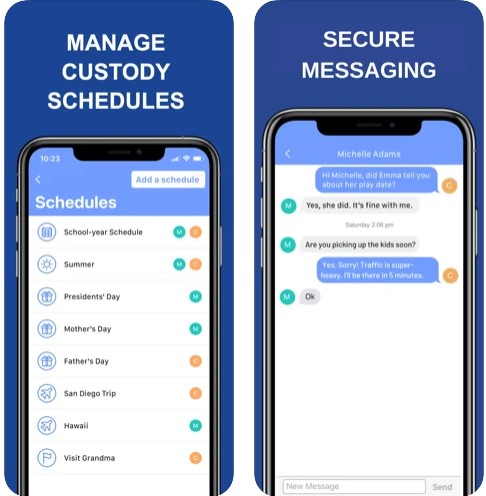
By the way, WeParent offers a built-in chat. So, you can send private or group messages to your family members at any time you want!
The best option of this app – it allows you to make schedules. Thus, you can plan your holidays, travel, timetable, and other things. Moreover, you can use the templates or create your own schedules. All the invited users can keep track of your entered data in real-time.
If you open the Library section, you will find a wide range of functions. For example, you can add grocery or to-do lists, write notes, download documents, and save pictures or contacts.
By the way, WeParent offers a built-in chat. So, you can send private or group messages to your family members at any time you want!
 Another useful option there – the app’s version is constantly updated. Plus, the app comes with a free 14-day trial. After that, you should pick the most suitable plan. The first person pays and other invited family members can use it free.
Moving on, the developer guarantees 100% safety. All the data are stored in the cloud and you can have access to them from any device.
What is more, WeParent boasts a quite user-friendly interface. Besides, the navigation process is very simple. So, we can surely say that you will quickly understand how everything works there!
Worried that your child spends too much time with gadgets? Install a screen timer app to control the amount of their screen time.
All in all, WeParent is a must-have tool for all parents. We have not found any negative comments from users, so we believe it will fully suit you as well!
Another useful option there – the app’s version is constantly updated. Plus, the app comes with a free 14-day trial. After that, you should pick the most suitable plan. The first person pays and other invited family members can use it free.
Moving on, the developer guarantees 100% safety. All the data are stored in the cloud and you can have access to them from any device.
What is more, WeParent boasts a quite user-friendly interface. Besides, the navigation process is very simple. So, we can surely say that you will quickly understand how everything works there!
Worried that your child spends too much time with gadgets? Install a screen timer app to control the amount of their screen time.
All in all, WeParent is a must-have tool for all parents. We have not found any negative comments from users, so we believe it will fully suit you as well!
List of reviewed apps:
Key Features
- Shared family calendar with templates and custom scheduling options
- Centralized library for lists, notes, documents, photos, and contact information
- Built-in messaging system for private and group family conversations
- Real-time synchronization across all family members’ devices
- Customizable family type setup for different household structures
Pros and Cons
- Pros:
- All-in-one solution eliminates the need for multiple apps to stay organized
- Real-time updates mean everyone stays on the same page (literally)
- Regular app updates keep features fresh and bug-free
- Cons:
- Learning curve for families unfamiliar with shared digital organization tools
- Requires all family members to download and actively use the app
Bottom Line
WeParent is perfect for busy families who want to ditch the sticky notes and group text chaos. Whether you’re juggling multiple schedules, coordinating grocery runs, or just trying to remember who has soccer practice, this app keeps everyone connected and informed in one convenient place.