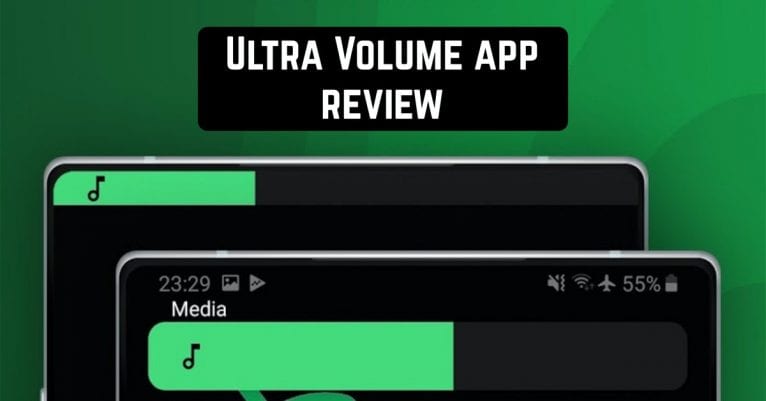
 Google Play has an app called Ultra Volume that you can use to customize the design and usage of the soundbar.
The first time you launch the application and try to select the soundbar theme, the application will ask you to give it access to the sound keys.
There is a stylization for popular mobile systems and applications. For example, the simplest and most convenient option is to move the soundbar to the notification area. This is an ideal way not to worry that the volume control panel covers the video you are watching.
Google Play has an app called Ultra Volume that you can use to customize the design and usage of the soundbar.
The first time you launch the application and try to select the soundbar theme, the application will ask you to give it access to the sound keys.
There is a stylization for popular mobile systems and applications. For example, the simplest and most convenient option is to move the soundbar to the notification area. This is an ideal way not to worry that the volume control panel covers the video you are watching.
List of reviewed apps:
Volume control
With this app, you can change the volume control both vertically and horizontally. You can choose the colors that best suit your smartphone’s color theme. You can also select a gradient to decorate the cover. Smooth animation is available, which improves the use of the volume slider and makes the process even more enjoyable. You can change the size of the volume control as you wish. There is also a feature that allows you to set a certain amount of time for the desired instrument to be on the screen. You can also set the volume level to a certain value. When the volume reaches a peak, the phone will vibrate.Music
For music lovers, there may be a need for panels that contain a widget for the music currently being played. One press of the volume button, and the track control panel will appear in front of you. You can also listen to music from the individual sound outputs. To make a selection, go to the appropriate application menu. You can sign each audio output device yourself, that is, give it a name.Gestures
Special gestures are also available here, which saves you the need to use the buttons on your phone. Simply swipe your finger off the edge of the screen and the volume control appears on the phone screen. You can use it to increase or decrease the volume, just like with conventional buttons. There’s also a composite panel – all three controls on one tile. To use them, you must give the application access to notifications. The app lets you mute the sound that accompanies your changes in volume level.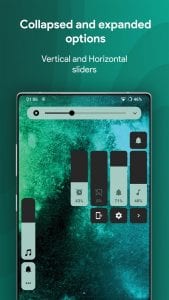
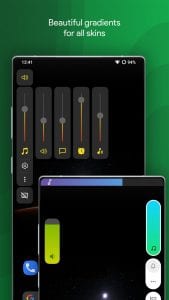 Other options include “Single Volume”, a common slider that changes the volume of all sounds simultaneously. The “Advanced” item contains the option of muting Ultra Volume in certain applications.
Ultra Volume is a great application for customizing your phone. Now you can design all the necessary tools in one style and enjoy the beauty and convenience of using all the functions of your phone.
You may also like: One Shade app review
Other options include “Single Volume”, a common slider that changes the volume of all sounds simultaneously. The “Advanced” item contains the option of muting Ultra Volume in certain applications.
Ultra Volume is a great application for customizing your phone. Now you can design all the necessary tools in one style and enjoy the beauty and convenience of using all the functions of your phone.
You may also like: One Shade app review
Key Features
- Customize volume control appearance with multiple themes styled after popular mobile systems
- Reassign volume buttons to launch apps instead of controlling audio
- Move volume panel to notification area to prevent screen obstruction
- Adjust volume slider orientation (vertical or horizontal) to match your preference
- Apply custom colors and gradients with smooth animations for a polished feel
Pros and Cons
- Pros:
- Solves the annoying problem of volume panels blocking content during videos or games
- Extensive customization options let you make the volume control match your phone’s aesthetic
- Quick app launching via volume buttons is genuinely convenient once you get used to it
- Cons:
- Requires accessibility permissions, which some users may be hesitant to grant
- Learning curve to remap volume buttons without accidentally changing your actual volume at inopportune moments
Bottom Line
If you’re tired of that bulky volume panel photobombing your screen and want more control over your phone’s quick actions, Ultra Volume is worth downloading. It’s perfect for power users and anyone who watches a lot of video content on their Android device and wants a cleaner, more customizable audio experience.