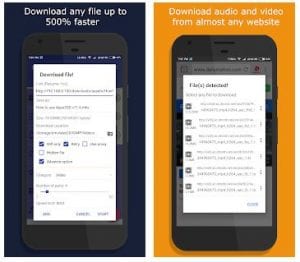
 The thing that we loved the most about this app, though is video downloading. You can get any video almost from any website and social media as well. All you have to do is to copy the link of the required video and add it to the app by pressing the plus icon in the lower-left corner.
Then press Add to the clipboard. It will give you different quality options (144p, 240p, 360p, 480p. 720p), choose the one you want and proceed. You can download any file in this way, not just videos. There is a great option too of downloading the files in batches. It allows you to add multiple links, not one by one but all of them at once.
And when you downloaded a movie that you want you can enjoy watching it on your TV. If you have a Hisense brand, you can also check out our list of the best apps for the Hisense TV.
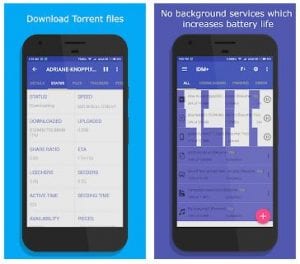
IDM has also a built-in browser that is very fast and efficient. It detects automatically any media files on the current page and it will show the list in the notifications right next to the link bar. Downloading media has never been easier.
This app is not just about downloading and that’s it. IDM offers a password manager, hosts management, and grabber. It is very useful as it replaces 3 additional apps minimum.
The thing that we loved the most about this app, though is video downloading. You can get any video almost from any website and social media as well. All you have to do is to copy the link of the required video and add it to the app by pressing the plus icon in the lower-left corner.
Then press Add to the clipboard. It will give you different quality options (144p, 240p, 360p, 480p. 720p), choose the one you want and proceed. You can download any file in this way, not just videos. There is a great option too of downloading the files in batches. It allows you to add multiple links, not one by one but all of them at once.
And when you downloaded a movie that you want you can enjoy watching it on your TV. If you have a Hisense brand, you can also check out our list of the best apps for the Hisense TV.
IDM has also a built-in browser that is very fast and efficient. It detects automatically any media files on the current page and it will show the list in the notifications right next to the link bar. Downloading media has never been easier.
This app is not just about downloading and that’s it. IDM offers a password manager, hosts management, and grabber. It is very useful as it replaces 3 additional apps minimum.
 The tech support answers all the inquiries not only in the Store but in the Telegram channel. Any of your questions will be answered within minutes there. They also organize weekly quizzes in Telegram to win a promo for IDM+ with even more amazing features.
A little tip: you can find lots of useful videos on Instagram nowadays. Find them on IPTV. Use our list of apps for better convenience.
We are officially huge fans of this app. It manages downloads perfectly and will not let you down. IDM is reliable, fast, and user-friendly. We insist you try it, promise you will not be disappointed.
The tech support answers all the inquiries not only in the Store but in the Telegram channel. Any of your questions will be answered within minutes there. They also organize weekly quizzes in Telegram to win a promo for IDM+ with even more amazing features.
A little tip: you can find lots of useful videos on Instagram nowadays. Find them on IPTV. Use our list of apps for better convenience.
We are officially huge fans of this app. It manages downloads perfectly and will not let you down. IDM is reliable, fast, and user-friendly. We insist you try it, promise you will not be disappointed.

List of reviewed apps:
Key Features
- High-speed downloading with connection resumption for interrupted transfers
- Video downloading from websites and social media platforms
- Multiple quality options (144p through 720p) for video selection
- Torrent file support for expanded download capabilities
- Batch download functionality to save time on multiple files
Pros and Cons
- Pros:
- Intuitive user interface that’s easy to navigate, even for beginners
- Versatile functionality handles videos, files, and torrents all in one app
- Reliable connection recovery prevents lost downloads from frustrating restarts
- Cons:
- Learning curve for advanced features like batch downloading
- Video quality options may be limited depending on the source website
Bottom Line
If you’re constantly hunting for videos online or dealing with flaky internet connections, IDM is absolutely worth downloading. Whether you’re grabbing files, videos from social media, or managing torrents, this app consolidates everything into one simple, reliable tool that actually works.