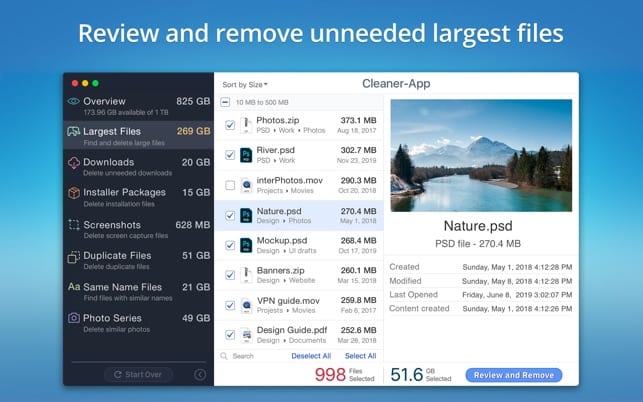
 All you have to do is to install this app on your Mac and launch the scanning of your disk space. Depending on how difficult the situation is with your disk, it will take some amount of time before the scanning process is completed, but it usually never takes too long compared with other software.
You can use similar software for your mobile devices as well. See how you can hide the apps on your phone in this article.
Then you will see a report on the largest files on your computer, of the files you use the least, and the overall analysis of the space on the disk. After that, the app will suggest deleting the bulkiest files.
By the way, Cleaner-App will also demonstrate to you the list of all the downloaded files and all the installations files – so you will be able to get rid of unnecessary ones without picking them up from all over the Mac.
All you have to do is to install this app on your Mac and launch the scanning of your disk space. Depending on how difficult the situation is with your disk, it will take some amount of time before the scanning process is completed, but it usually never takes too long compared with other software.
You can use similar software for your mobile devices as well. See how you can hide the apps on your phone in this article.
Then you will see a report on the largest files on your computer, of the files you use the least, and the overall analysis of the space on the disk. After that, the app will suggest deleting the bulkiest files.
By the way, Cleaner-App will also demonstrate to you the list of all the downloaded files and all the installations files – so you will be able to get rid of unnecessary ones without picking them up from all over the Mac.
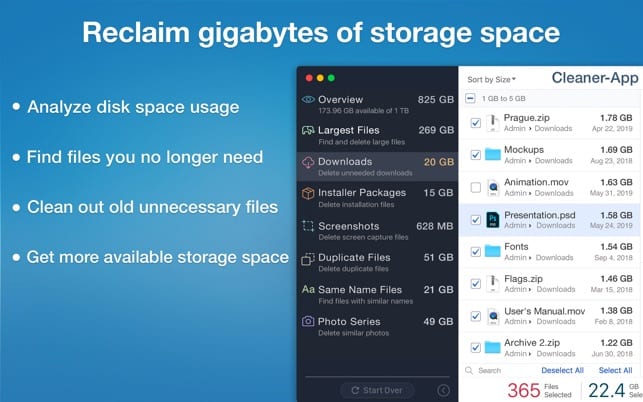 These all features are available in the free version and you can also get the PRO version where you will find even more amazing options.
For instance, the software will collect all the photos from one photoshoot, will sort out files by the date, name, or size, remove similar photos (if you wish), sort out all the screenshots, remove useless duplicates, and many more. Another crucial feature of Cleaner-App is it guarantees the total privacy of your personal data.
And when your PC is clean from the unwanted files – you can find the time to find the best websites to watch cartoons.
Summarizing all the points mentioned above it is fair to claim that Cleaner-App is exactly that kind of optimization software that you might be looking for nowadays. Now you don’t have to worry about sorting and deleting unwanted pictures manually – use the app instead!
These all features are available in the free version and you can also get the PRO version where you will find even more amazing options.
For instance, the software will collect all the photos from one photoshoot, will sort out files by the date, name, or size, remove similar photos (if you wish), sort out all the screenshots, remove useless duplicates, and many more. Another crucial feature of Cleaner-App is it guarantees the total privacy of your personal data.
And when your PC is clean from the unwanted files – you can find the time to find the best websites to watch cartoons.
Summarizing all the points mentioned above it is fair to claim that Cleaner-App is exactly that kind of optimization software that you might be looking for nowadays. Now you don’t have to worry about sorting and deleting unwanted pictures manually – use the app instead!

List of reviewed apps:
Key Features
- AI-powered duplicate file detection and removal
- Automatic organization of downloads into a single folder
- Disk space scanning and analysis
- One-click cleaning to free up storage without manual effort
- Fast scanning performance compared to other cleanup utilities
Pros and Cons
- Pros:
- Hands-off approach — install, scan, and let AI handle the cleanup
- Reasonably fast scanning times for thorough disk analysis
- Automatically consolidates scattered downloads for better organization
- Cons:
- Requires regular use to maintain optimal disk performance
- Another app taking up storage space on an already cluttered drive
Bottom Line
If you’re tired of playing digital hoarder and want your Mac to run smoothly again without the effort of manually sorting through files, Cleaner-App is worth installing. It’s ideal for anyone whose disk is crying for help and who appreciates the convenience of letting AI do the dirty work.