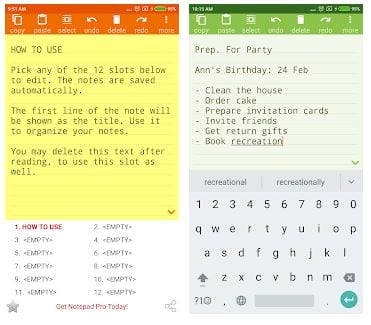
 At the top of the screen, you can see the main actions for working with notepad: copy, paste, select, undo, delete, and redo. There is More (additional menu) button top right. It suggests you send a note by e-mail, insert a date, time, or signature, save all notes in the cloud, and download them. You can find Settings and a PRO features button.
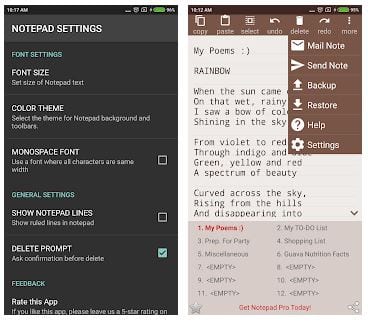
Using Settings, you can change the text parameters, such as Font size and characters width. There, you can also adjust general settings (color scheme, notepad lines, bottom bar, etc.) and text settings (your signature, date-time format, etc.)
At the top of the screen, you can see the main actions for working with notepad: copy, paste, select, undo, delete, and redo. There is More (additional menu) button top right. It suggests you send a note by e-mail, insert a date, time, or signature, save all notes in the cloud, and download them. You can find Settings and a PRO features button.
Using Settings, you can change the text parameters, such as Font size and characters width. There, you can also adjust general settings (color scheme, notepad lines, bottom bar, etc.) and text settings (your signature, date-time format, etc.)
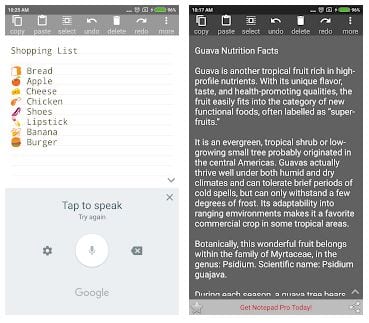 The feedback section is the last one in Settings. The app’s technical support works well. Notepad provides FAQ as well. The application has an excellent laconic design, nothing superfluous, no ads!
Notepads are basically for the old-school guys (and there is nothing bad about that). And if you’re still using the prepaid cards – you can check out the cash apps which accept them.
In the free version, there is a choice of one of eight color schemes. The paid one provides many additional exciting features, for example, unlimited notes, search within notes, checkable lists, sort/group notes, custom themes, and many others.
The feedback section is the last one in Settings. The app’s technical support works well. Notepad provides FAQ as well. The application has an excellent laconic design, nothing superfluous, no ads!
Notepads are basically for the old-school guys (and there is nothing bad about that). And if you’re still using the prepaid cards – you can check out the cash apps which accept them.
In the free version, there is a choice of one of eight color schemes. The paid one provides many additional exciting features, for example, unlimited notes, search within notes, checkable lists, sort/group notes, custom themes, and many others.
 The application stands out among its counterparts with maximum ease of use, functional and intuitive design, small size (63kb), and the absolute absence of ads even in the free version.
Do you often use your notepad to write down the song lyrics there? If you do, don’t forget to use the auto-tune apps when you record them in the studio!
All in all, NOTEPAD Simple AdFree is the best notebook for your smartphone you can imagine. Try it and love this little helper with all your heart!
The application stands out among its counterparts with maximum ease of use, functional and intuitive design, small size (63kb), and the absolute absence of ads even in the free version.
Do you often use your notepad to write down the song lyrics there? If you do, don’t forget to use the auto-tune apps when you record them in the studio!
All in all, NOTEPAD Simple AdFree is the best notebook for your smartphone you can imagine. Try it and love this little helper with all your heart!
List of reviewed apps:
Key Features
- Clean, distraction-free note-taking interface with no ads cluttering your workspace
- 12 available note slots in the free version for organizing multiple notes
- Essential text formatting options including font size and character width adjustments
- Cloud sync functionality to save and download your notes across devices
- Quick-access toolbar with copy, paste, undo, redo, and delete functions
Pros and Cons
- Pros:
- Ad-free experience means you can focus on note-taking without interruptions
- Simple, intuitive design makes it accessible even for users who aren’t tech-savvy
- Cloud backup feature ensures your notes won’t disappear if you lose your device
- Cons:
- Limited to 12 notes in the free version, which may feel restrictive for heavy note-takers
- Basic feature set means you won’t find advanced formatting or rich text options
Bottom Line
NOTEPAD Simple AdFree is perfect for anyone tired of bloated note-taking apps filled with unnecessary bells and whistles. If you just need a reliable, no-nonsense place to jot down quick thoughts, lists, and reminders without advertisements getting in your way, this app delivers exactly what it promises.