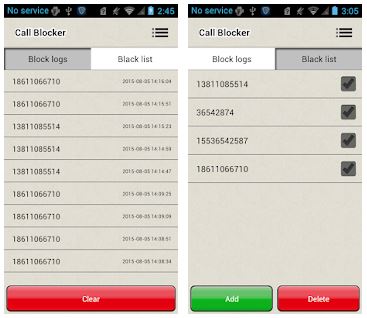
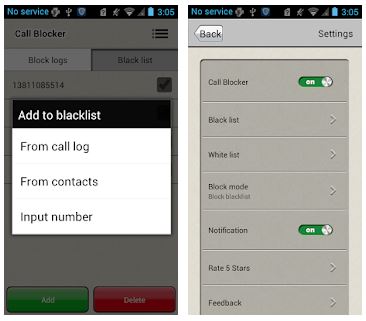
 There is no need to create an account, so you can quickly start using this app. By the way, Call Blocker is a quite popular app that does not ask for a fee. This is quite a rare advantage for this kind of apps. So, after downloading this tool, you should insert the number you want to block. Or, you can choose it from your call log or contacts.
Call Blocker offers a wide range of block modes. In this app, there are black and white lists. In the black one, you should add all undesired numbers. In the white list, you will find numbers that you don’t want to block. In addition to the aforesaid, you can even block all unknown calls that are not in your contact book. Or, you can even block all numbers!
There is no need to create an account, so you can quickly start using this app. By the way, Call Blocker is a quite popular app that does not ask for a fee. This is quite a rare advantage for this kind of apps. So, after downloading this tool, you should insert the number you want to block. Or, you can choose it from your call log or contacts.
Call Blocker offers a wide range of block modes. In this app, there are black and white lists. In the black one, you should add all undesired numbers. In the white list, you will find numbers that you don’t want to block. In addition to the aforesaid, you can even block all unknown calls that are not in your contact book. Or, you can even block all numbers!
 What is more, the developer constantly updates the app’s version to satisfy all users’ needs and wishes. No doubt, this is a great bonus! As for the app’s interface, it is very simple to navigate. So, we can surely say that this app will be suitable for everyone! The majority of users really like this app – we have not found any negative comments.
More call blocker apps can be found here.
To sum up, if you want to reject all unnecessary calls, Call Blocker is a must-have tool for this task. So, hurry up to try this app – we believe, you will like it!
What is more, the developer constantly updates the app’s version to satisfy all users’ needs and wishes. No doubt, this is a great bonus! As for the app’s interface, it is very simple to navigate. So, we can surely say that this app will be suitable for everyone! The majority of users really like this app – we have not found any negative comments.
More call blocker apps can be found here.
To sum up, if you want to reject all unnecessary calls, Call Blocker is a must-have tool for this task. So, hurry up to try this app – we believe, you will like it!

List of reviewed apps:
Key Features
- Lightweight installation at just 5.6MB, perfect for phones with limited storage
- No account creation required — start blocking calls instantly
- Black and white list functionality to customize which numbers to block or allow
- Block unknown callers automatically with a single toggle
- Free to download and use with no premium subscription fees
Pros and Cons
- Pros:
- Completely free with no hidden charges or mandatory account setup
- Easy to use with quick access to block numbers from call logs or contacts
- Minimal storage footprint won’t slow down your phone
- Cons:
- Basic feature set compared to more advanced call blocking apps
- Limited customization options beyond standard black and white lists
Bottom Line
If you’re tired of unwanted calls from telemarketers, spam numbers, or that one person you’d rather not talk to, Call Blocker is a no-fuss solution worth downloading. It’s perfect for anyone who wants straightforward call blocking without the bloat of extra features or account requirements.