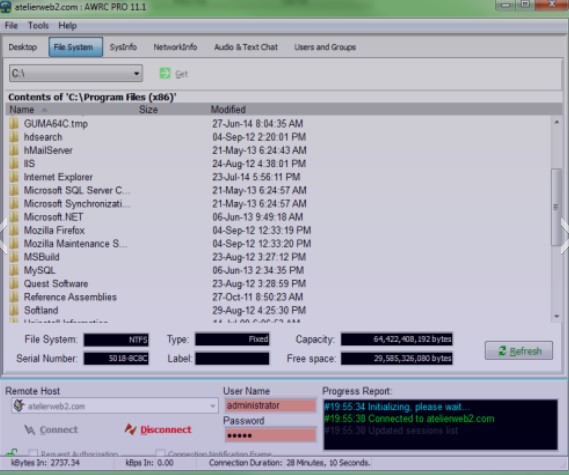
 The best part there – you don’t have to download any software on the remote machine.
Despite a great number of functions, the program is very convenient to use. In case you have faced any difficulties, you can read tutorials or contact responsive tech support.
So, in Atelier Web Remote Commander Professional, you can carry out various tasks remotely:
The best part there – you don’t have to download any software on the remote machine.
Despite a great number of functions, the program is very convenient to use. In case you have faced any difficulties, you can read tutorials or contact responsive tech support.
So, in Atelier Web Remote Commander Professional, you can carry out various tasks remotely:
- Check account information and password hashes
- View system and network information (physical memory, RDS/TS, ports, statistics, routing, IP/Transport protocols, etc.)
- Scan all machines in your LAN
- Check all IP addresses in a specific range
- Send Wake-on-LAN signals
- Record sessions
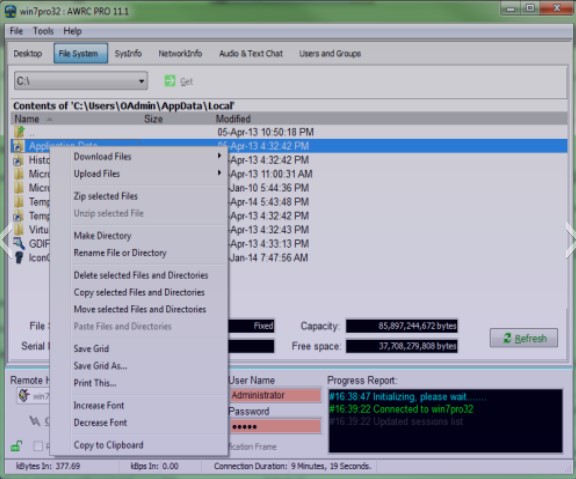 As for the additional options, the program contains built-in chat, access control, remote surveillance, Ping function, Unicode support, and so many other features!
By the way, how about the universal remote apps? Now you can easily control your TV and other devices, using your phone.
All in all, Atelier Web Remote Commander Professional is a must-have tool for remote audit and inventory. This software ideally suits system administrators and support services. Highly recommended!
As for the additional options, the program contains built-in chat, access control, remote surveillance, Ping function, Unicode support, and so many other features!
By the way, how about the universal remote apps? Now you can easily control your TV and other devices, using your phone.
All in all, Atelier Web Remote Commander Professional is a must-have tool for remote audit and inventory. This software ideally suits system administrators and support services. Highly recommended!
List of reviewed apps:
Key Features
- Remote server control and computer access without requiring software installation on target machines
- Comprehensive system and network diagnostics including memory, protocols, ports, and routing information
- LAN scanning and IP range detection for network discovery and management
- Wake-on-LAN functionality to power on remote devices
- Session recording capabilities for documentation and troubleshooting purposes
Pros and Cons
- Pros:
- Lightweight installation with minimal storage footprint—no waiting around for bloated software
- No client software needed on remote machines, making deployment significantly easier
- Intuitive interface packed with powerful features, so you don’t need a PhD in IT to use it
- Cons:
- Requires 64-bit operating systems, leaving 32-bit users out in the cold
- Learning curve on advanced network diagnostics features may require consulting tutorials or support
Bottom Line
If you’re an IT professional, system administrator, or network manager who needs reliable remote access and detailed system diagnostics, Atelier Web Remote Commander Professional is a solid choice. The agent-free architecture and comprehensive feature set make it ideal for managing multiple machines across your network without the headache of deploying software everywhere.