 Note: If you are going to use your Android device to connect to a computer, it does not have to be an old and useless one. You can use your usual smartphone when you need a computer webcam.
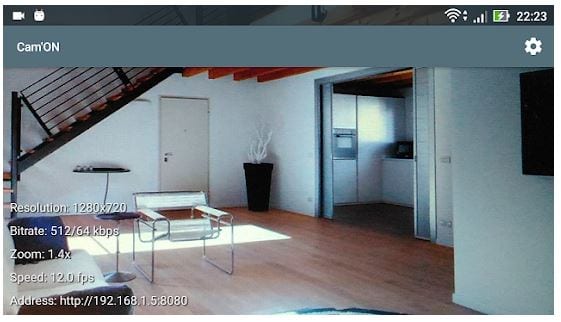
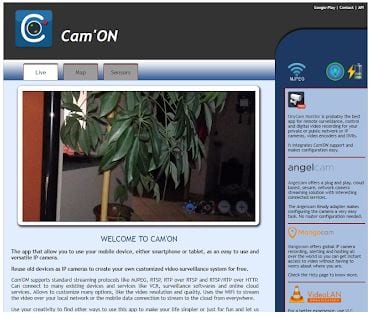
Launch the CamON Live Streaming application. In the lower-left corner, you can see camera parameters: its resolution, bitrate, scale, FPS. If you want to change them or other parameters, then go to the Settings icon top right.
And if you’re tech-savvy enough, you can even make this stream play live on YouTube and play it in the background. Check out the apps that will assist you with that.
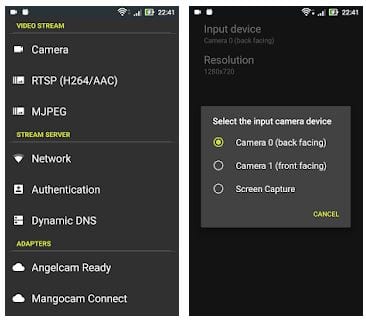
In the first three sections of the application settings, there are the camera image parameters. Here you can change the image’s orientation from the default horizontal to vertical, set a different resolution up to the maximum supported by the camera, enable autofocus, enable night mode, select a different FPS, etc.
Note: If you are going to use your Android device to connect to a computer, it does not have to be an old and useless one. You can use your usual smartphone when you need a computer webcam.
Launch the CamON Live Streaming application. In the lower-left corner, you can see camera parameters: its resolution, bitrate, scale, FPS. If you want to change them or other parameters, then go to the Settings icon top right.
And if you’re tech-savvy enough, you can even make this stream play live on YouTube and play it in the background. Check out the apps that will assist you with that.
In the first three sections of the application settings, there are the camera image parameters. Here you can change the image’s orientation from the default horizontal to vertical, set a different resolution up to the maximum supported by the camera, enable autofocus, enable night mode, select a different FPS, etc.
 Attention! The application implements the connection of the gadget camera to the computer only via the local network. It implements such a connection with the assistance of a special driver program installed to your computer. If you plan using your device’s camera as a webcam, connect both the gadget and the computer to the same local network.
CamON Live Streaming’s capabilities for using an Android device as a surveillance camera are immense. CamON Live Streaming successfully captures motion in the frame, thanks to which it successfully implements an alarm system. Also, there is a night vision function. CamON Live Streaming.
Attention! The application implements the connection of the gadget camera to the computer only via the local network. It implements such a connection with the assistance of a special driver program installed to your computer. If you plan using your device’s camera as a webcam, connect both the gadget and the computer to the same local network.
CamON Live Streaming’s capabilities for using an Android device as a surveillance camera are immense. CamON Live Streaming successfully captures motion in the frame, thanks to which it successfully implements an alarm system. Also, there is a night vision function. CamON Live Streaming.
 If at the moment you’re tired of trying to control your own life, you can relax by watching the best Korean shows.
To sum up, CamON Live Streaming is definitely unique for its ability to adjust various camera settings in terms of free use! This app perfectly realizes the project of giving a second life to unnecessary Android-gadgets – obsolete or partially damaged. CamON Live Streaming amazes with the variety and possibilities of its functions, and absolutely everyone should try it!
(No longer available on Google Play)
If at the moment you’re tired of trying to control your own life, you can relax by watching the best Korean shows.
To sum up, CamON Live Streaming is definitely unique for its ability to adjust various camera settings in terms of free use! This app perfectly realizes the project of giving a second life to unnecessary Android-gadgets – obsolete or partially damaged. CamON Live Streaming amazes with the variety and possibilities of its functions, and absolutely everyone should try it!
(No longer available on Google Play)
List of reviewed apps:
Key Features
- Transform any Android device into a live streaming camera or webcam
- Customizable streaming parameters including resolution, bitrate, FPS, and scale
- Stream directly to platforms like YouTube for live broadcasting
- Connect to computers for use as a webcam in video calls and recording
- Lightweight app that works on older or spare smartphones
Pros and Cons
- Pros:
- Completely free — no need to buy expensive CCTV or webcam hardware
- Gives old smartphones a second life instead of gathering dust in a drawer
- Advanced customization options for users who want to tweak streaming quality
- Cons:
- Requires decent internet connection for smooth live streaming performance
- May drain battery quickly on older devices due to continuous camera and streaming usage
Bottom Line
CamON Live Streaming is perfect for anyone looking to repurpose old Android phones into functional cameras without spending extra money. Whether you need a home security setup, a backup webcam for video meetings, or a way to stream content online, this free app delivers solid functionality with customizable options for tech-savvy users.