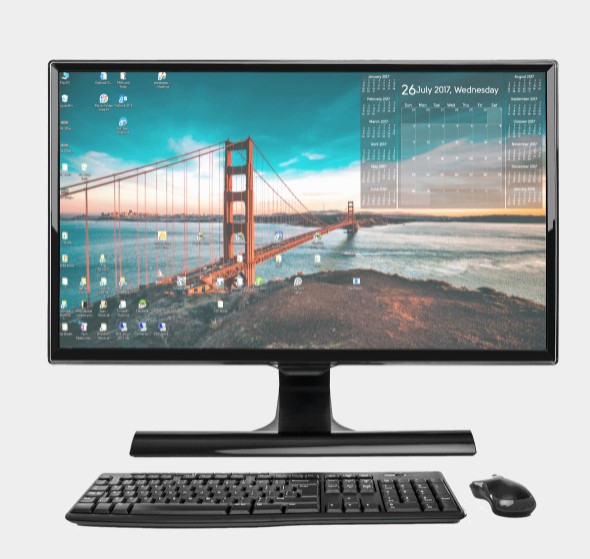
 Moving on, DejaDesktop allows you to adjust a great number of settings. For example, you can choose an appropriate image of the calendar, location, size, daily start or end time.
Apart from the calendar functions, the software allows you to monitor the list of tasks and contacts on the wallpaper.
Another option that many users will certainly like – you can also add Google Calendar to your PC background. The only thing you need to do – connect your Google account, choose the size and customize day view parameters.
After that, it will be automatically updated every day, so there is no need to constantly log in to Google.
Moving on, DejaDesktop allows you to adjust a great number of settings. For example, you can choose an appropriate image of the calendar, location, size, daily start or end time.
Apart from the calendar functions, the software allows you to monitor the list of tasks and contacts on the wallpaper.
Another option that many users will certainly like – you can also add Google Calendar to your PC background. The only thing you need to do – connect your Google account, choose the size and customize day view parameters.
After that, it will be automatically updated every day, so there is no need to constantly log in to Google.
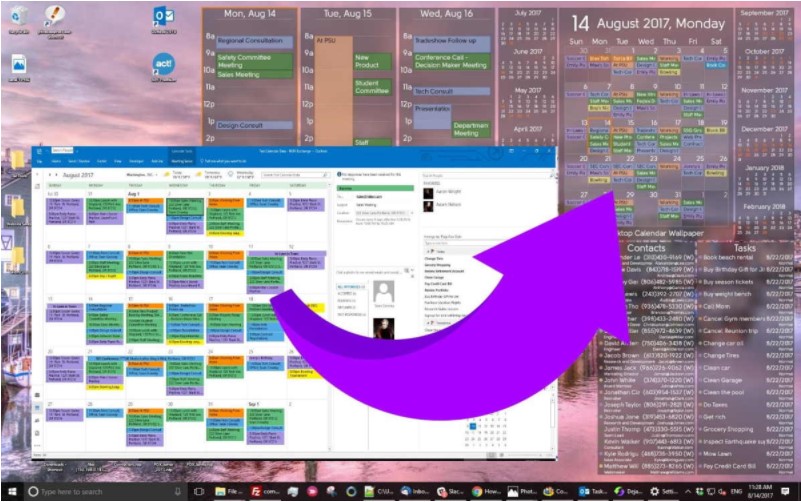 As for the program’s interface, it is very simple to manage. Plus, the navigation process is very convenient as well. Thus, you don’t have to be tech-savvy to understand how everything works there.
If you have faced any technical difficulties while using this tool, the developer offers user guides on the official website. Besides,
you can also contact customer support. The customer specialists are very responsive, so they will quickly solve all your problems!
The majority of users truly like this program, as we have not found any negative feedback.
And don’t forget to check the apps for remote desktop for Windows 10.
Summarizing all the points, DejaDesktop will be useful for everyone – office workers, students, businessmen, etc. So, hurry up to download it – we believe you will not regret!
As for the program’s interface, it is very simple to manage. Plus, the navigation process is very convenient as well. Thus, you don’t have to be tech-savvy to understand how everything works there.
If you have faced any technical difficulties while using this tool, the developer offers user guides on the official website. Besides,
you can also contact customer support. The customer specialists are very responsive, so they will quickly solve all your problems!
The majority of users truly like this program, as we have not found any negative feedback.
And don’t forget to check the apps for remote desktop for Windows 10.
Summarizing all the points, DejaDesktop will be useful for everyone – office workers, students, businessmen, etc. So, hurry up to download it – we believe you will not regret!
List of reviewed apps:
Key Features
- Displays a customizable calendar directly on your desktop wallpaper
- Integrates Google Calendar for automatic syncing of your events
- Shows task lists and contact information alongside your calendar
- Adjustable size, position, fonts, and display times for total personalization
- Lightweight installation with minimal system resource usage
Pros and Cons
- Pros:
- Free version available with no installation headaches
- Works seamlessly across Windows and Mac platforms
- Google Calendar integration keeps your schedule always visible
- Cons:
- Free version may have limited customization compared to Pro
- Desktop wallpaper clutter if you prefer minimal aesthetics
Bottom Line
DejaDesktop is perfect for productivity enthusiasts who want their schedule front and center without opening another window. If you’re the type who benefits from constant visual reminders of what’s coming up, this lightweight tool is worth downloading at no cost to see if it fits your workflow.