
List of reviewed apps:
Main features of the program: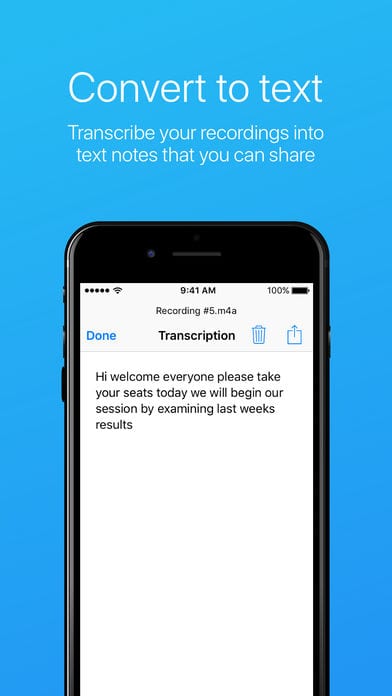
- recording in stereo mode (on devices that support it);
- the ability to record from the microphone of a Bluetooth headset;
- automatic stop recording during silence;
- use the camera microphone for better recording;
- select the quality of the recording by setting priorities (high quality or small file size);
- ready-made records can be shared with friends and easily saved to your computer.
- noise reduction;
- using the microphone of the camcorder, which improves the recording quality;
- sync with Android Wear;
- support of Dark and Light themes;
- support for a large number of audio formats and much more!


Key Features
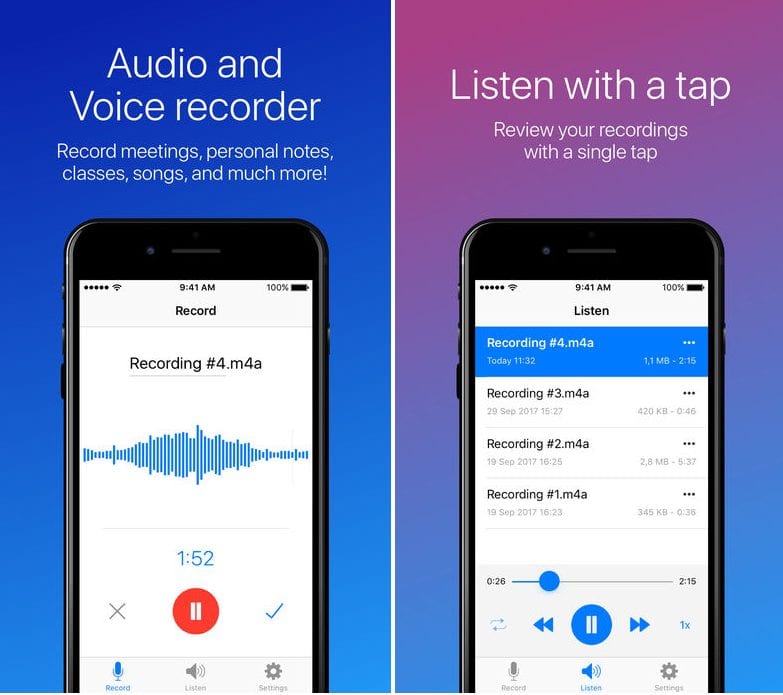
- One-tap recording that captures audio without complicated settings or menus
- Flexible sharing options to send recordings directly to social media, email, or cloud storage
- Intelligent silence detection that automatically pauses when you stop talking, saving storage space
- Quality controls so you can prioritize either crystal-clear audio or smaller file sizes depending on your needs
- Cross-device support including Bluetooth headsets and Android Wear integration for on-the-go recording
Pros and Cons
- Pros: Simple, intuitive interface that doesn’t require a learning curve; robust sharing capabilities; handy noise reduction and silence detection features
- Cons: Limited customization options for power users; may require significant storage space for longer recording sessions
Bottom Line
Easy Voice Recorder is perfect for students, journalists, and anyone who needs to capture quick thoughts and important conversations without fussing with technical details. If you’re looking for a straightforward, no-nonsense voice memo app that gets the job done, this is worth downloading.