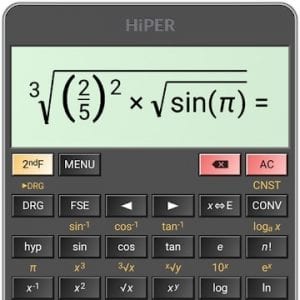
 The HiPER Scientific Calculator app has a huge amount of functionality that even includes formula and graph writing. You can enter different values that are necessary for your calculations.
This is one of the interesting and voluminous calculators, which is designed for users with a mathematical mind.
It is not just an application for standard calculations, but a real engineering graphical calculator. It can be used by a mathematical class pupil, a mathematical department student, or a researcher in the laboratory.
The application has two main advantages:
The HiPER Scientific Calculator app has a huge amount of functionality that even includes formula and graph writing. You can enter different values that are necessary for your calculations.
This is one of the interesting and voluminous calculators, which is designed for users with a mathematical mind.
It is not just an application for standard calculations, but a real engineering graphical calculator. It can be used by a mathematical class pupil, a mathematical department student, or a researcher in the laboratory.
The application has two main advantages:
- It shows the results of intermediate calculations while they are typed in the input line.
- The calculator builds accurate graphs and generates values along coordinate axes.
List of reviewed apps:
Features
From the available values, you can enter fractions, degrees, symbols, integrals, complex numbers, and much more. An unlimited number of braces, derivatives, complex numbers, coordinates, degrees, minutes, seconds, and so on are also available. To view the full history of operations that you have performed in this application, you can enable full-screen mode. It is especially convenient to use on tablets. The application does not need any special permissions during installation. But, for external storage the calculator requires permissions. This is because there are possibilities to export and import custom-defined variables and functions (XY,M key) to/from file. These permissions are asked just when you want to perform import or export. The app takes up little space and does not load the RAM of your phone. Thanks to this, the start and calculations are performed instantly.Design
The interface of the program is simple and clear enough. The application orientation can be configured for both the book and landscape versions. There is also a reduced version for compact screens. Besides, you can choose between different themes.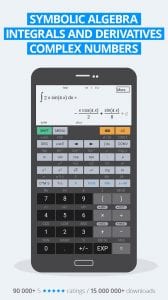
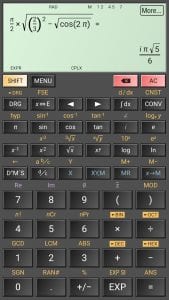 HiPER Scientific Calculator is a solution that will be closer to engineers and programmers than to ordinary users. There is little point in installing this calculator for simple calculations only. As the program is quite demanding on the processor power.
But, in some cases, there is a good reason for it because you can turn off advertising in the app and use it for free without a few features. It has a large memory and intuitive control, as well as adequate help. In general, if you are not afraid of the trigonometry tools, you can keep this application on top, especially if you are a student.
You may also like: 13 Best time calculator apps for Android & iOS
HiPER Scientific Calculator is a solution that will be closer to engineers and programmers than to ordinary users. There is little point in installing this calculator for simple calculations only. As the program is quite demanding on the processor power.
But, in some cases, there is a good reason for it because you can turn off advertising in the app and use it for free without a few features. It has a large memory and intuitive control, as well as adequate help. In general, if you are not afraid of the trigonometry tools, you can keep this application on top, especially if you are a student.
You may also like: 13 Best time calculator apps for Android & iOS
Key Features
- Advanced scientific functions including trigonometry, logarithms, and exponential calculations
- Real-time display of intermediate calculation results as you type
- Graph plotting capabilities with coordinate axis generation
- Formula input and symbolic math support for complex equations
- Support for variables and custom calculations beyond basic arithmetic
Pros and Cons
- Pros:
- Comprehensive scientific and engineering functionality in one app
- Intuitive interface with live calculation preview
- Accurate graphing makes visualizing data actually enjoyable
- Cons:
- The extensive feature set may overwhelm casual users just looking for basic math
- Steep learning curve if you’re not already comfortable with scientific notation and advanced functions
Bottom Line
If you’re a student tackling calculus homework, an engineer crunching numbers, or anyone who regularly needs more than basic arithmetic, HiPER Scientific Calculator is absolutely worth downloading. It transforms your phone into a legitimate graphing calculator without the $100+ price tag of traditional models.