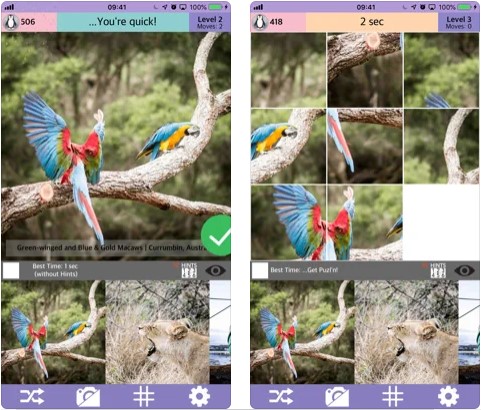
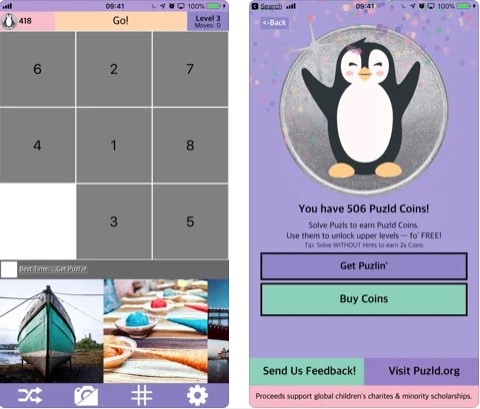
 The whole picture is drawn at the bottom, and its chaotically arranged parts are at the top. You need to assemble them into a whole picture. You need to control the parts of the picture by swiping. The app’s interface is pleasant, bright, and colorful. The colors are chosen professionally.
There are plenty of pictures presented by the developer but players are able to use their own pictures and photos to have more fun. There is a timer above the pictures so that players can beat their previous records. The number of parts of the picture increases with each level – the first level has 4 parts, then 9, 16, and so on.
The whole picture is drawn at the bottom, and its chaotically arranged parts are at the top. You need to assemble them into a whole picture. You need to control the parts of the picture by swiping. The app’s interface is pleasant, bright, and colorful. The colors are chosen professionally.
There are plenty of pictures presented by the developer but players are able to use their own pictures and photos to have more fun. There is a timer above the pictures so that players can beat their previous records. The number of parts of the picture increases with each level – the first level has 4 parts, then 9, 16, and so on.
 There are also memory card games for kids – check out this list to discover them all.
During the game, the player receives coins that can be spent on new amazing pictures. The technical support of the application is good, the developer is always ready to help fix problems related to the game. But the fails of the game are really seldom. The game is a great way to spend spare time and get positive emotions.
There are also memory card games for kids – check out this list to discover them all.
During the game, the player receives coins that can be spent on new amazing pictures. The technical support of the application is good, the developer is always ready to help fix problems related to the game. But the fails of the game are really seldom. The game is a great way to spend spare time and get positive emotions.
List of reviewed apps:
Key Features
- Drag-and-drop puzzle assembly with intuitive swiping controls
- Progressive difficulty levels starting at 4 pieces and expanding up to 16+ pieces
- Built-in timer to track and beat your personal best times
- Upload custom photos and pictures to create personalized puzzles
- Bright, colorful interface designed for both kids and adults
Pros and Cons
- Pros: Great for developing logic skills, helpful tutorial on startup, excellent customization with your own photos, and a satisfying difficulty curve
- Cons: Limited replay value with developer’s built-in picture set alone, and the increasing piece count can get quite challenging very quickly
Bottom Line
Puzld is perfect for puzzle enthusiasts of all ages who want a casual brain-teaser that grows with them. Download it if you’re looking for a colorful, straightforward puzzle game that lets you bring your own photos into the mix and compete against your own best times.