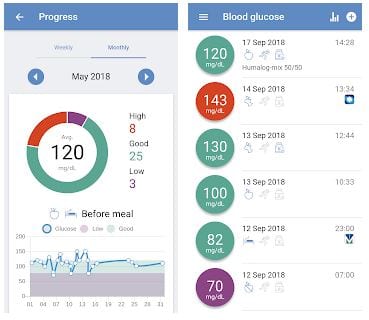
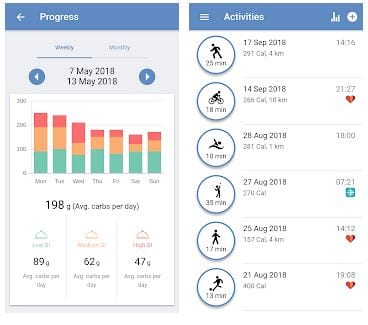
 Based on data analyzes, forDiabetes compiles reports on your health. They help monitor your progress and stay on track with your goals.
What is essential, forDiabetes has a cool feature: you can share your data with your doctor or any other caregiver in real-time for immediate recommendation and conversation.
When you first open the app, it tells you about its features and benefits, but you can skip it. You can continue as a guest, but you’d better complete your registration to avoid losing your data. You can sign up using your email, Facebook account, or Google account. By the way, forDiabetes is adapted for ten languages!
Based on data analyzes, forDiabetes compiles reports on your health. They help monitor your progress and stay on track with your goals.
What is essential, forDiabetes has a cool feature: you can share your data with your doctor or any other caregiver in real-time for immediate recommendation and conversation.
When you first open the app, it tells you about its features and benefits, but you can skip it. You can continue as a guest, but you’d better complete your registration to avoid losing your data. You can sign up using your email, Facebook account, or Google account. By the way, forDiabetes is adapted for ten languages!
 Next, indicate the units of measurement in which it is convenient for you to control your indicators. Then fill in your type of diabetes, year of birth, and your country.
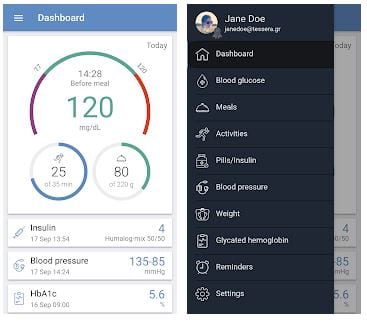
In the center of the main screen, there is your glucose measurement scale. You can see a Meal icon underneath, where you fill in the number of carbs eaten after each meal. There is the icon of your daily activity in minutes next to the Meal. In addition, there are fields for the medication you are taking and your blood pressure.
Next, indicate the units of measurement in which it is convenient for you to control your indicators. Then fill in your type of diabetes, year of birth, and your country.
In the center of the main screen, there is your glucose measurement scale. You can see a Meal icon underneath, where you fill in the number of carbs eaten after each meal. There is the icon of your daily activity in minutes next to the Meal. In addition, there are fields for the medication you are taking and your blood pressure.
 ForDiabetes does much more than just analyzing your data. It has a collection of articles, tips, and news that can be useful for your health.
If you buy the Premium version, you will have full access to the Web application, your insulin dose calculation, real-time backup, and other advanced features.
You may also like: 25 Best productivity apps for Android & iOS
All in all, forDiabetes is a highly recommended and extremely useful app for those who faced diabetes in their life. ForDiabetes helps you live in peace with and control your diabetes.
ForDiabetes does much more than just analyzing your data. It has a collection of articles, tips, and news that can be useful for your health.
If you buy the Premium version, you will have full access to the Web application, your insulin dose calculation, real-time backup, and other advanced features.
You may also like: 25 Best productivity apps for Android & iOS
All in all, forDiabetes is a highly recommended and extremely useful app for those who faced diabetes in their life. ForDiabetes helps you live in peace with and control your diabetes.


List of reviewed apps:
Key Features
- Track multiple health metrics in one place — glucose levels, carbohydrate intake, medications, blood pressure, and physical activity
- Manual entry or automatic sync with compatible third-party devices and health apps for seamless data collection
- Smart analytics that identify patterns and fluctuations in your health data over time
- Generate detailed health reports to monitor progress and keep you accountable to your goals
- Share real-time data with doctors and caregivers for instant feedback and medical guidance
Pros and Cons
- Pros:
- All-in-one solution eliminates the need to juggle multiple diabetes management apps
- Doctor sharing feature bridges the gap between you and your healthcare provider
- Flexible sign-up options (email, Facebook, Google) make getting started quick and easy
- Cons:
- Guest mode is tempting but risky — you could lose all your data if you don’t create an account
- Manual data entry for some metrics can feel tedious if you’re not syncing with compatible devices
Bottom Line
If you’re tired of managing diabetes with a stack of different apps and spreadsheets, forDiabetes is worth downloading. It’s especially valuable if you want your doctor in the loop without the back-and-forth emails and phone calls — just share your dashboard and let the data do the talking.