 By the way, Moby Chip allows users to use export options. For example, it supports various audio export formats – wav, AAC/m4a, caf, ringtone/m4r. Plus, all the exported audio files can be used without editing!
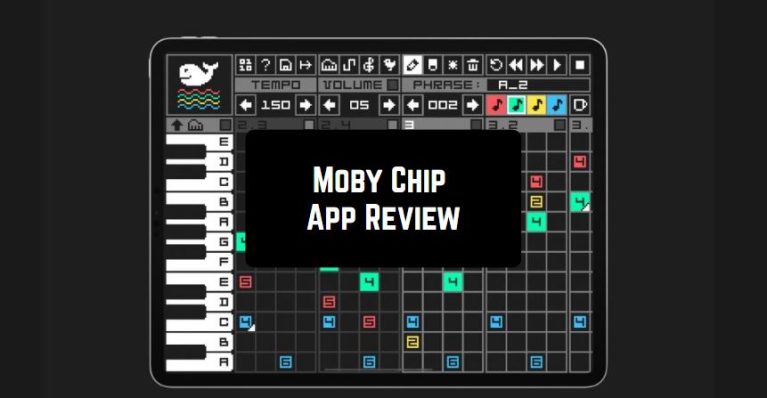
The app’s interface is very straightforward. On the top of the screen, there is a menu bar with a wide range of buttons. There is a built-in piano-style keyboard on the left side of the screen. If you want to extend the keyboard, click on the piano icon. But keep in mind-it plays only one note at a time! The full manual is also available in the app by pressing the “question mark” icon.
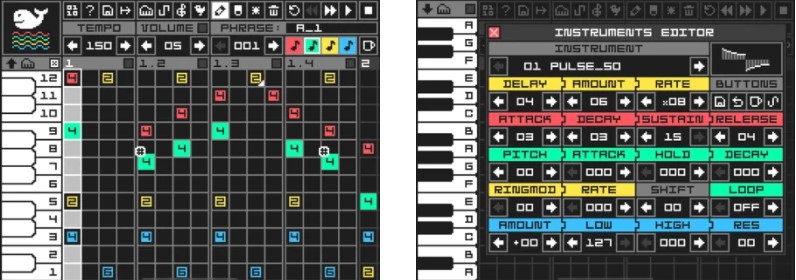
There is a built-in Instruments Editor that will help you to generate retro-sounds. The editor includes a great variety of functions- for example, Wave Editor, vibrato with delay, SID style ADSR(Attack, Decay, Sustain, Release) envelope, ring modulation, and a Pitch Envelope.
By the way, Moby Chip allows users to use export options. For example, it supports various audio export formats – wav, AAC/m4a, caf, ringtone/m4r. Plus, all the exported audio files can be used without editing!
The app’s interface is very straightforward. On the top of the screen, there is a menu bar with a wide range of buttons. There is a built-in piano-style keyboard on the left side of the screen. If you want to extend the keyboard, click on the piano icon. But keep in mind-it plays only one note at a time! The full manual is also available in the app by pressing the “question mark” icon.
There is a built-in Instruments Editor that will help you to generate retro-sounds. The editor includes a great variety of functions- for example, Wave Editor, vibrato with delay, SID style ADSR(Attack, Decay, Sustain, Release) envelope, ring modulation, and a Pitch Envelope.
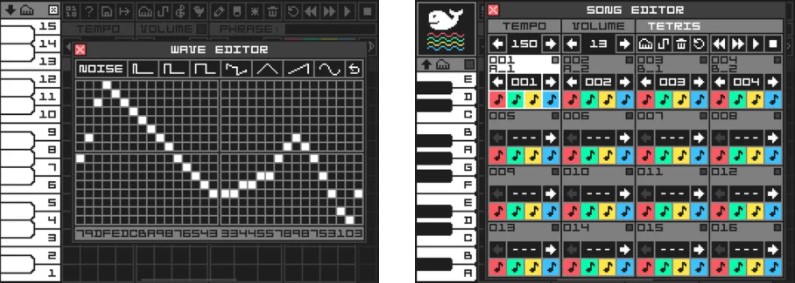 Moving on, in the Song Editor, you can easily generate a full song or performance set. It contains 16 pages of 16 slots. Each slot represents a phrase and displays its position number, phrase name, phrase number, and a mute button for each track. The song will end when it comes to an empty slot.
In case you decide to add vocals to your instrumental you can check out pitch correction apps.
If you have faced any difficulties while working with this tool, on the official website you can read a detailed manual. So, we can surely say that even novice users will quickly find out how everything works there! Overall, Moby Chip is full of useful features. Hurry up to try it – you will not regret!
Moving on, in the Song Editor, you can easily generate a full song or performance set. It contains 16 pages of 16 slots. Each slot represents a phrase and displays its position number, phrase name, phrase number, and a mute button for each track. The song will end when it comes to an empty slot.
In case you decide to add vocals to your instrumental you can check out pitch correction apps.
If you have faced any difficulties while working with this tool, on the official website you can read a detailed manual. So, we can surely say that even novice users will quickly find out how everything works there! Overall, Moby Chip is full of useful features. Hurry up to try it – you will not regret!
List of reviewed apps:
Key Features
- Create monophonic chiptune tracks using 4-bit 32 sample wavetables
- Generate custom sound effects and drums with random pitched noise
- Sample-based timing system ensures accurate tempo control for your compositions
- Export tracks in multiple formats: WAV, AAC/M4A, CAF, and M4R ringtone
- Built-in piano-style keyboard with expandable range for on-the-fly playing
Pros and Cons
- Pros: Straightforward interface that’s easy to navigate, versatile export options that let you use your creations immediately, and excellent for retro game audio enthusiasts
- Cons: Monophonic playback means you can only play one note at a time, which limits harmonic complexity in your compositions
Bottom Line
Moby Chip is the go-to app for indie game developers, chiptune musicians, and anyone looking to craft authentic retro-style sound effects without complicated music production software. If you’re building a pixel art game or just love 8-bit nostalgia, this app delivers the authentic bleeps and bloops you’re after.