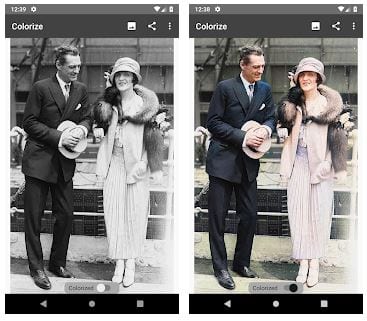
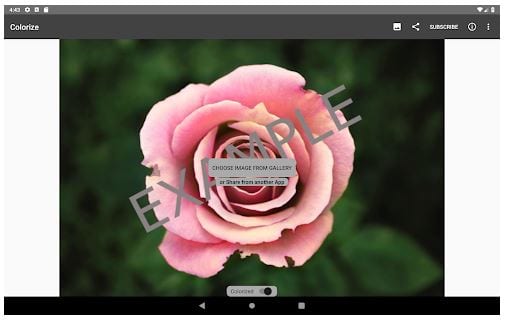
 On the menu page, you will find all the necessary editing tools – Saturation, Auto Contrast, and Render Factor. Plus, the app enables you to compare the original picture and the edited one in one click.
Moving on, when you click on the second button at the top of the screen, you can easily share an edited picture or its link with friends or beloved ones via e-mail or other sources. Moreover, the app allows you to choose a picture from the gallery, Google Photos, Facebook, or Twitter.
On the menu page, you will find all the necessary editing tools – Saturation, Auto Contrast, and Render Factor. Plus, the app enables you to compare the original picture and the edited one in one click.
Moving on, when you click on the second button at the top of the screen, you can easily share an edited picture or its link with friends or beloved ones via e-mail or other sources. Moreover, the app allows you to choose a picture from the gallery, Google Photos, Facebook, or Twitter.
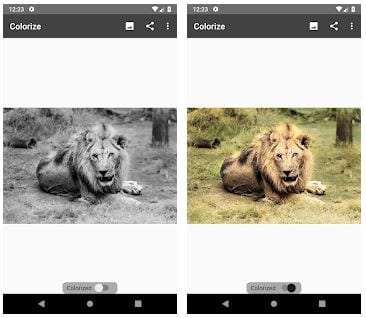 Colorize Images app boasts a minimalistic design that ensures a user-friendly interface. So, you will quickly find out how all the functions work there. Besides, in case of any issues, while using the app, you can contact technical support. The customer specialists are ready to help you anytime with any questions.
If you want to get advanced in photo editing, you should check out this list.
The manufacturer constantly updates the app version to satisfy all users’ needs and wishes. Colorize Images app comes with a free version, but you can purchase additional options and remove ads at a quite reasonable price.
Colorize Images app boasts a minimalistic design that ensures a user-friendly interface. So, you will quickly find out how all the functions work there. Besides, in case of any issues, while using the app, you can contact technical support. The customer specialists are ready to help you anytime with any questions.
If you want to get advanced in photo editing, you should check out this list.
The manufacturer constantly updates the app version to satisfy all users’ needs and wishes. Colorize Images app comes with a free version, but you can purchase additional options and remove ads at a quite reasonable price.
 In order to have more fun, you can check out apps to cartoon yourself.
Summarizing all the points mentioned above, Colorize Images app is truly worth downloading. A great number of photo effects, easy navigation, and adjustable settings – the major features of this app. So, if you can not find an appropriate tool to colorize B&W pictures, you should definitely try this variant. We believe you will not regret it!
In order to have more fun, you can check out apps to cartoon yourself.
Summarizing all the points mentioned above, Colorize Images app is truly worth downloading. A great number of photo effects, easy navigation, and adjustable settings – the major features of this app. So, if you can not find an appropriate tool to colorize B&W pictures, you should definitely try this variant. We believe you will not regret it!


List of reviewed apps:
Key Features
- Transform black and white photos into vibrant colored images with AI-powered colorization
- Adjust saturation, contrast, and rendering factors for fine-tuned color control
- Side-by-side comparison view to see your original and edited photos instantly
- Import images from your gallery, Google Photos, Facebook, or Twitter
- Share edited photos directly via email or other social platforms without creating an account
Pros and Cons
- Pros: No account required, intuitive minimalist interface, quick colorization results, multiple import and sharing options
- Cons: Limited to colorization (doesn’t offer broader photo editing tools), may require internet connection for AI processing
Bottom Line
If you’re nostalgic about old family photos or simply want to breathe new life into black and white images without learning complex editing software, Colorize Images is worth downloading. It’s the perfect tool for anyone who wants professional-looking results in seconds, with zero setup required.