 Phiewer Image Viewer is the easiest and fastest way to view images, videos, and even audio files. It is designed so that you can easily view multimedia in one window without any additional clicks and selections.
Fast and responsive user interface: your media files will easily fit directly into the viewing window, also in full-screen mode. A simple control panel and many shortcuts for viewing, rotating, playing, pausing, switching and much more are built right into the system.
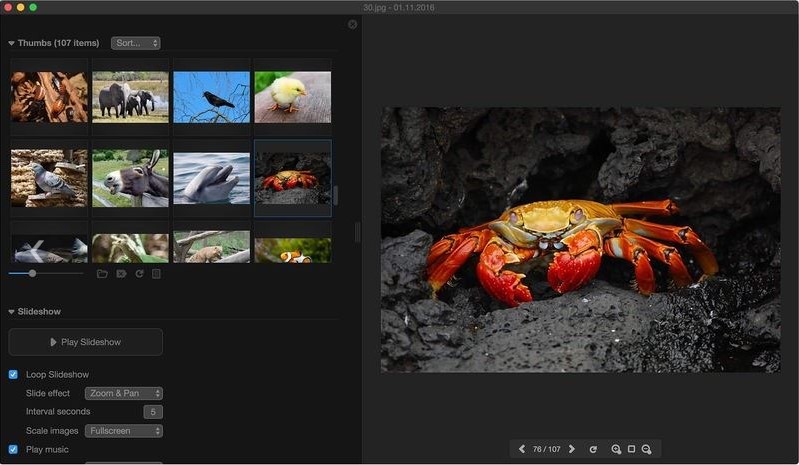
Phiewer also displays the most common image formats from a RAW camera. For example, a multimedia slideshow: click the play button to automatically view media folders with beautiful transition effects and background music.
Phiewer Image Viewer is the easiest and fastest way to view images, videos, and even audio files. It is designed so that you can easily view multimedia in one window without any additional clicks and selections.
Fast and responsive user interface: your media files will easily fit directly into the viewing window, also in full-screen mode. A simple control panel and many shortcuts for viewing, rotating, playing, pausing, switching and much more are built right into the system.
Phiewer also displays the most common image formats from a RAW camera. For example, a multimedia slideshow: click the play button to automatically view media folders with beautiful transition effects and background music.
 You can set the interval speed of each slide, choose your music from really cool selected background tracks. There is also an option to choose your own music on the hard disk.
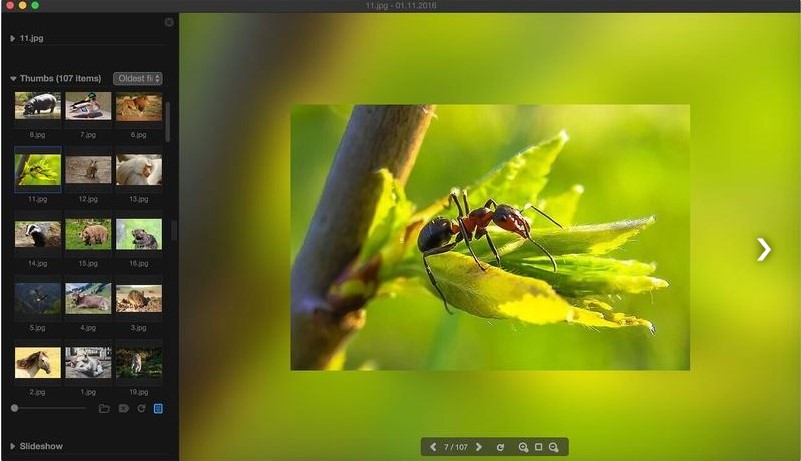
The Phiewer (lite) Image Viewer app is a stunning viewing effect. It turns the entire background of the interface into a blurry environment, as you may have seen in many videos on the Internet. And even plays animated GIF files.
Apart from that, you can also check the best slideshow apps for Android.
This viewer is universal, it copes with all popular formats, and automatically downloads all supported files from the specified folder. The program can be used for free, but with some restrictions.
You can set the interval speed of each slide, choose your music from really cool selected background tracks. There is also an option to choose your own music on the hard disk.
The Phiewer (lite) Image Viewer app is a stunning viewing effect. It turns the entire background of the interface into a blurry environment, as you may have seen in many videos on the Internet. And even plays animated GIF files.
Apart from that, you can also check the best slideshow apps for Android.
This viewer is universal, it copes with all popular formats, and automatically downloads all supported files from the specified folder. The program can be used for free, but with some restrictions.
List of reviewed apps:
Key Features
- Rapid image viewing with support for multiple file formats including photos, videos, and audio files
- Full-screen mode for immersive media browsing without distracting UI elements
- Fast and responsive interface designed to handle large media libraries without lag
- Simple keyboard shortcuts and control panel for quick navigation between files
- Single-window viewing experience that eliminates the need for multiple apps or windows
Pros and Cons
- Pro: Lightning-fast performance makes it ideal for users with extensive photo collections
- Pro: Minimalist design keeps the focus on your media, not cluttered menus
- Pro: Versatile enough to handle photos, videos, and audio files in one app
- Con: Limited editing capabilities—this is a viewer, not a photo editor
- Con: May lack advanced organization and tagging features that power users expect
Bottom Line
If you’re tired of sluggish image viewers that make simple browsing feel like a chore, Phiewer is worth a download. It’s perfect for anyone who just wants to quickly flip through their digital photo library without unnecessary bells and whistles getting in the way. This one’s for the “show me my photos, fast” crowd.