 The app provides you convenient search, as you can put a destination on your own or choose it by proposed categories and geographic coordinates. The points of interest (POI) are divided into several categories and the app selects them according to your address or the location you set.
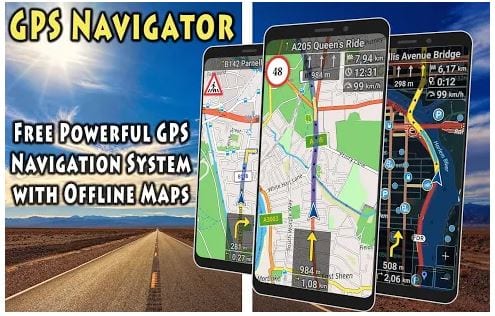
GPS Navigator App shows you the direction even if you are driving, cycling, or walking. The app offers you detailed maps and shows information about arrival time. If you want, you can set up a map code: day, night, and light sensor.
What is more, the app allows you to save favorite places. You can add them to the map or import them from the files.
If you’re interested in GPS Navigator you definitely read our article about the best land surveying apps.
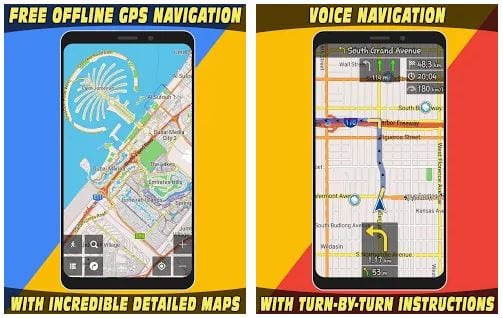
No need to worry if you take a wrong turn – the app will automatically adjust the correct route. The integrated voice navigation prevents you from being distracted on the road. Plus, the app does not require a constant Internet connection, as it uses offline maps.
The app provides you convenient search, as you can put a destination on your own or choose it by proposed categories and geographic coordinates. The points of interest (POI) are divided into several categories and the app selects them according to your address or the location you set.
GPS Navigator App shows you the direction even if you are driving, cycling, or walking. The app offers you detailed maps and shows information about arrival time. If you want, you can set up a map code: day, night, and light sensor.
What is more, the app allows you to save favorite places. You can add them to the map or import them from the files.
If you’re interested in GPS Navigator you definitely read our article about the best land surveying apps.
No need to worry if you take a wrong turn – the app will automatically adjust the correct route. The integrated voice navigation prevents you from being distracted on the road. Plus, the app does not require a constant Internet connection, as it uses offline maps.
 In addition to GPS options, the app contains such functions as weather and compass. The app enables you to create a travel list and check GPS information as well. GPS Navigator App shows you different traffic warnings like stop signs, sharp turns, or railway crossings.
When you travel (even with the GPS navigator) you never know what you’re going to face. In order to be better prepared, you can download the anti-barking apps to stay protected from aggressive pets.
GPS Navigator App boasts a user-friendly interface and its multifunctional design fully complements the ideas of the app. It comes with a free version, so hurry up to download this incredible GPS App!
In addition to GPS options, the app contains such functions as weather and compass. The app enables you to create a travel list and check GPS information as well. GPS Navigator App shows you different traffic warnings like stop signs, sharp turns, or railway crossings.
When you travel (even with the GPS navigator) you never know what you’re going to face. In order to be better prepared, you can download the anti-barking apps to stay protected from aggressive pets.
GPS Navigator App boasts a user-friendly interface and its multifunctional design fully complements the ideas of the app. It comes with a free version, so hurry up to download this incredible GPS App!

List of reviewed apps:
Key Features
- Real-time GPS navigation with turn-by-turn directions for driving, cycling, and walking
- Customizable map display modes including day, night, and light sensor settings
- Extensive Points of Interest (POI) database organized by categories for easy discovery
- Flexible destination search using manual entry, category selection, or geographic coordinates
- Travel time estimates and arrival notifications for better trip planning
Pros and Cons
- Pro: No registration required — jump straight into navigating without the usual app signup hassle
- Pro: Multiple navigation modes mean whether you’re driving, cycling, or on foot, the app has you covered
- Pro: Detailed maps with intelligent POI categorization help you discover places without endless scrolling
- Con: Map customization options, while nice, may overwhelm users looking for a simpler interface
- Con: Performance on older devices or slower connections may vary
Bottom Line
If you’re tired of complicated GPS apps that demand your life story before letting you navigate, GPS Navigator App is worth checking out. It’s perfect for casual users and frequent travelers who want straightforward directions without the registration friction.